

 Click on the Category button to get more articles regarding that product.
Intunes / M365 compliance policy check rules warnings in several languages
Error in Intunes:
“English locale must be specified”
Happens when:
You upload a JSON compliance rule in ONLY one non US language.

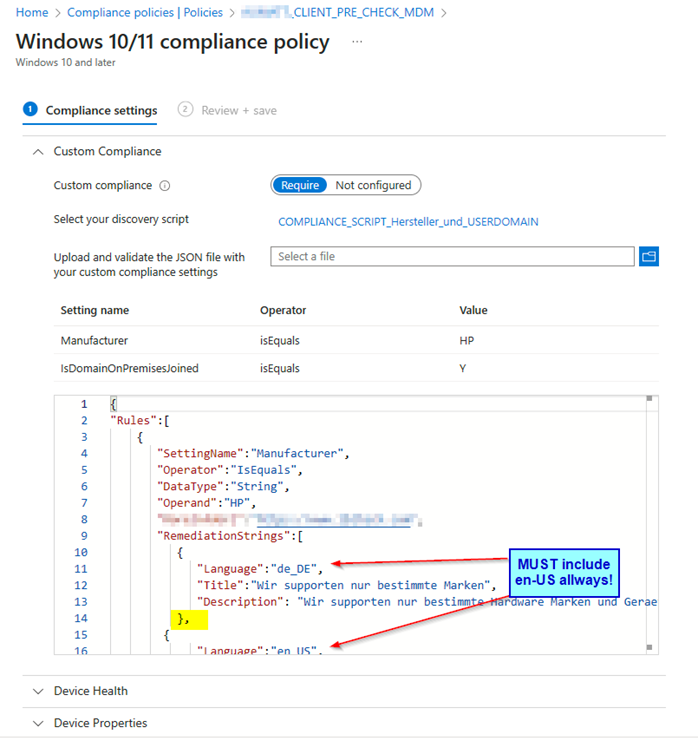
For the Compliance Checks in Intunes/M365 we did not find any info 09/2023 on microsoft.com on how to change the language of the alerts, which are shown to the enduser, could be changed to multiply languages.
https://learn.microsoft.com/en-us/mem/intune/protect/compliance-custom-json
If we want as example de_DE and en_US same message or different messages for the same rule entry:
| Part which does that: One language JSON file and you upload that you get and error |
|
“RemediationStrings”:[ |
|
|

| Multiple languages , seperated (Yellow) You allways have to include en_US if you want a NON US language |
|
“RemediationStrings”: [ |
If you just pick as example german (Just a non us code) you get an error.
So you ALLWAYS have to include the en_US and then your add. language.
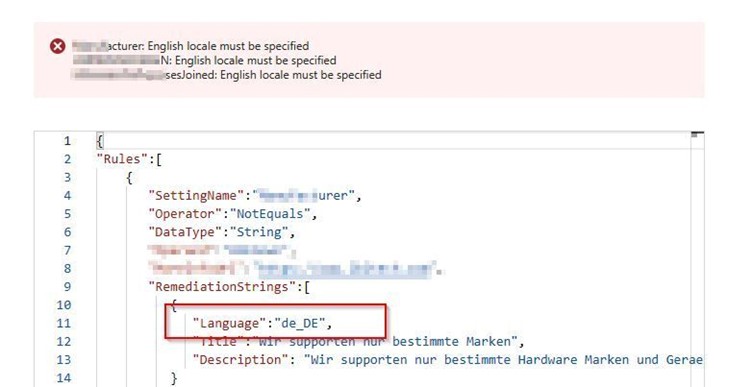
Microsoft told us that they will change the Learn instructions and include this sample on our request.