
 Click on the Category button to get more articles regarding that product.
verify code sign certificates with our freeware tool to automatic
If you’re searching for an easy way to check an EXE signature online or verify a code signing certificate on an executable, you’ve come to the right place. Over the last 20 years, we’ve seen how Certificate Revocation (CRL) issues on Windows systems—especially in enterprises—can cause slow application launches, failed updates, and unpredictable errors. These problems often go unnoticed, even by IT teams, because the delays are intermittent and hard to reproduce.
Even with modern security tools, signed executables may fail to run smoothly if Windows cannot access the Certificate Revocation List (CRL) or Online Certificate Status Protocol (OCSP) URLs. Firewalls, proxies, or web filters can block these requests, causing delays that are often mistaken for antivirus or endpoint protection issues.
Why You Should Verify Code Signing Certificates on Executables
Digital signatures are critical for software security. Developers sign executables to ensure their programs are trusted, pass security scans, and prevent tampering. However, a signed executable is only fully trusted if the client system can reach the associated CRL and OCSP URLs.
When certificate verification fails:
- Applications may take minutes to start instead of seconds
- OS or software updates can fail or run inconsistently
- Enterprise deployments of Windows 7, 10, 11, or Windows Server may encounter driver installation delays
- Security teams may waste hours troubleshooting misdiagnosed performance issues
Without proper verification, even minor network restrictions can create performance bottlenecks and security gaps. That’s why checking EXE signatures online and validating code signing certificates is essential for both security and system reliability.
Introducing CRLCheck – The Tool to Verify Executable Signatures
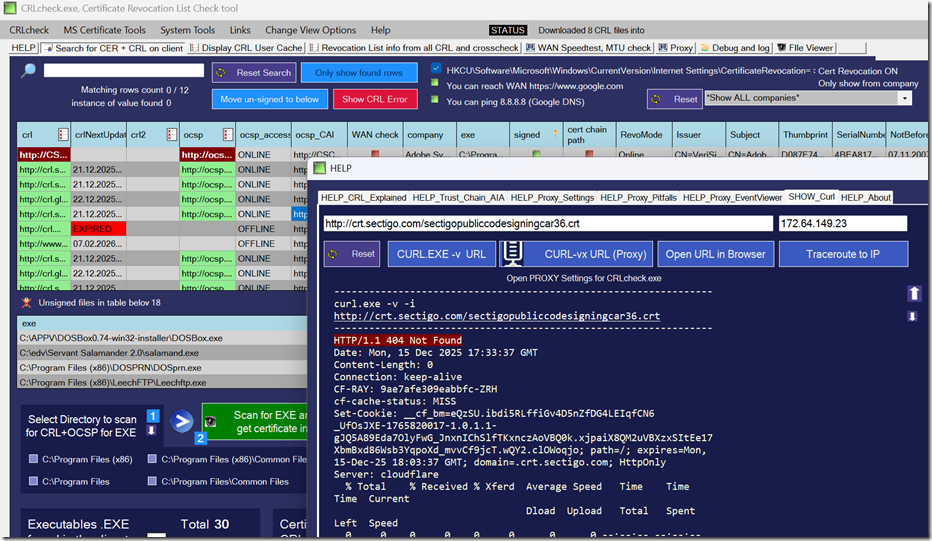
Download Freeware: https://www.butsch.ch/post/crlcheck-exe-certificate-revocation-list-check-tool-to-verify-all-crl-and-ocsp-on-windows-client/
To solve these challenges, we developed CRLCheck.exe, a free tool designed to make it easy to:
- Scan directories and running processes for
.exefiles - Detect digital signatures and retrieve associated CRL and OCSP information
- Verify accessibility of CRL and OCSP URLs from your client system
- Export certificates and CRL files, providing a detailed report for IT and security teams
- Identify blocked URLs, helping teams adjust firewalls or proxies to ensure smooth execution
CRLCheck gives you a complete list of Fully Qualified Domain Names (FQDNs) your endpoints reference for certificate verification. This list can be handed to network engineers or security teams to make sure critical URLs are accessible, eliminating performance issues and application delays.
How to Check EXE Signature Online with CRLcheck.exe
Using CRLcheck.exe is straightforward:
- Select a directory or scan running processes on your client machine.
- The tool detects all digitally signed executables.
- It retrieves and checks the CRL and OCSP URLs for each signed file.
- Results are exported in an easy-to-review format, including certificate details and cached CRL/OCSP information.
- Use the generated list to verify firewall and proxy settings, ensuring proper connectivity for certificate verification.
With CRLCheck.exe, you can quickly verify code signing certificates on executables and prevent delays caused by blocked certificate verification requests.
Why CRL Verification Matters for Security and Performance
- Security: Ensure that compromised or revoked certificates cannot execute unverified software on your systems.
- Performance: Avoid startup delays and intermittent errors caused by unreachable CRLs or OCSP endpoints.
- Enterprise Reliability: Keep large-scale OS deployments, server updates, and patching operations running smoothly, even in complex network environments with proxies and web filters.
Certificates can be revoked for many reasons, including if they were issued erroneously or if a private key has been compromised. Windows relies on CRLs and OCSP to confirm trust, but this only works if the system can access the URLs over the internet. For isolated networks, CRL files may need to be provided internally to maintain smooth operation.
Real-World Scenarios
We’ve seen multiple enterprises experience delays and failed updates because Windows executables were unable to access their CRL endpoints. Common issues include:
- Blue circle “waiting” icon when launching applications
- Antivirus software wrongly blamed for slow performance
- Misdiagnosed delays during large-scale Windows deployments
- Patching inconsistencies on Windows Server or Exchange systems
By running CRLcheck.exe, these problems can be identified and resolved quickly, without reducing overall system security.