Month: February 2015

WSUS: Windows Fonts Update February KB3013455 (MS15-010) FIXED with 3037639

  After you install security update 3013455 you may notice some text quality degradation in certain scenarios. This problem occurs on computers that are running the following operating systems: Windows Server 2008 Service Pack 2 (SP2) Windows Server 2003 SP2 Windows Vista SP2   Patch defect Fonts:                  KB3013455 (Patchday February 2015 / MS15-010) Patch corrected […]
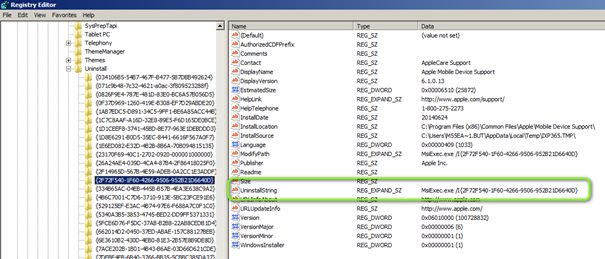
Deployment: Find GUID to Uninstall Software Silent W7/8 32/64BIT

Go through these Key Recursive and check for the value “UninstallString” under the GUID’s. HKEY_LOCAL_MACHINE\SOFTWARE\Microsoft\Windows\CurrentVersion\Uninstall HKEY_LOCAL_MACHINE\SOFTWARE\Wow6432Node\Microsoft\Windows\CurrentVersion\Uninstall MsiExec.exe /I{2F72F540-1F60-4266-9506-952B21D6640D} So Uninstall Silent of possible would be: MsiExec.exe /x{2F72F540-1F60-4266-9506-952B21D6640D } /qn REBOOT=ReallySuppress If the Uninstall works depends on the software and if the, as example, MSI Source file is STILL under The location mentioned in key: “InstallSource” […]

AVM Fritzbox Wiki Links

http://www.wehavemorefun.de/fritzbox/FRITZ!Box-Familie#FRITZ.21Box_Fon_WLAN http://www.wehavemorefun.de/fritzbox/FRITZ!Box_Fon_WLAN_7390 http://www.wehavemorefun.de/fritzbox/FRITZ!Box_Fon_WLAN_7490   PPPoE http://www.wehavemorefun.de/fritzbox/Dsld Bridge http://www.wehavemorefun.de/fritzbox/Brctl  

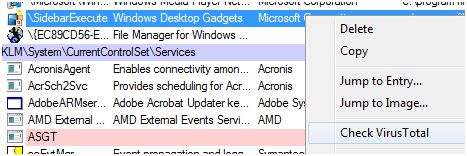
MS Systernals includes VirusTOTAL check with just one click

https://technet.microsoft.com/en-us/sysinternals/bb963902.aspx Mark Russinovich and Bryce Cogswell have released a new Version of their Autoruns tool. You can now check every Executable that resides in services, Autostart, RUNOCNE and other registry keys automatic with just one mouseclick on Virustotal. The Executable is then checked against a total of 50 virus search engines. This is asbolute great […]

Dameware can’t be installed on Vista or later with UAC enabled

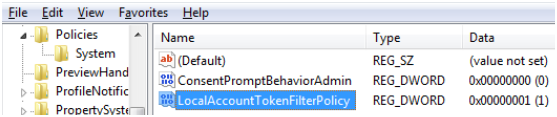
Dameware can’t be installed on Vista or later with UAC enabled Was “forced” to work on Vista for a related while invited for dinner 😉 Workaround Connect to the remote computer using Windows Remote Desktop or local On the remote computer, open Registry Editor (regedit.exe). Expand HKEY_LOCAL_MACHINE > SOFTWARE > Microsoft > Windows > CurrentVersion > policies, and then select […]