

 Click on the Category button to get more articles regarding that product.
Exchange 2016
McAfee Security for Exchange 8.6 SP2 (Safeservice.exe, RPCserv.exe (two instances), Postgres.exe (multiple instances))
D:\Program Files (x86)\McAfee\MSME\bin\SAFeService.exe
Server 2016
Source was: C: had no space in test lab server
If you see random Files with 96’201’998 (96MB) size under “C:\Windows\Temp\SAFe\” on your Exchange 2013/2016 those are from McAfee Security for Exchange 8.6. The shown server was a test lab running for long times a space on c: Drive did run out because it was unattended. You also see the “SAFe” directory under “D:\Program Files (x86)\McAfee\MSME\bin\lang\0409\SAFe”
Problem is finding something about thise issue since 99% google result end up in is it “safe” to delete “c:\windows\temp” 😉
We used procmon.exe from Systernals to see what generates the files since the content is encrypted. You always have a bad feeling if you
See such files since Ransomware so maybe this helps someone once.
(From a first peek and moving files you think this is some kind of breach. Not very smart done by Mcafee…)
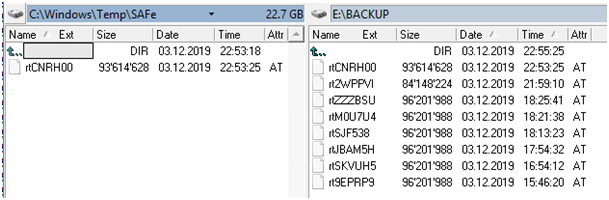
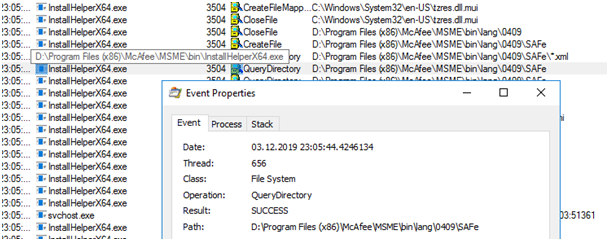
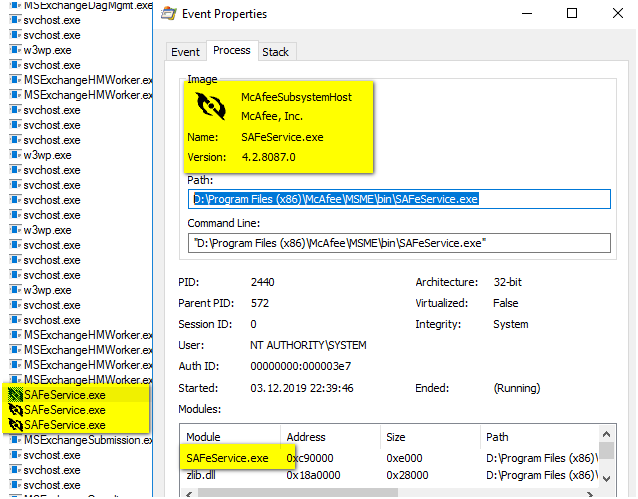
This event (IF your send E-Mail Alerts) should help too.
Since the Mcafee Security for Exchange OFTEN throws too much errors (RPC Crash > and it’s back) people often turn those reports OFF we have seen in Mcafee Forum.
Loading the Anti-Virus Engine failed on ’11/01/2018 19:19:53′.
1. Check whether the Product Update Information in the user interface is correct.
2. Check whether the corresponding folders with respect to DATs/Anti-Virus Engine version exists in the installation\\bin directory.
3. contact McAfee Technical Support.