Click on the Category button to get more articles regarding that product.
Exchange Subscription Edition Setup Error
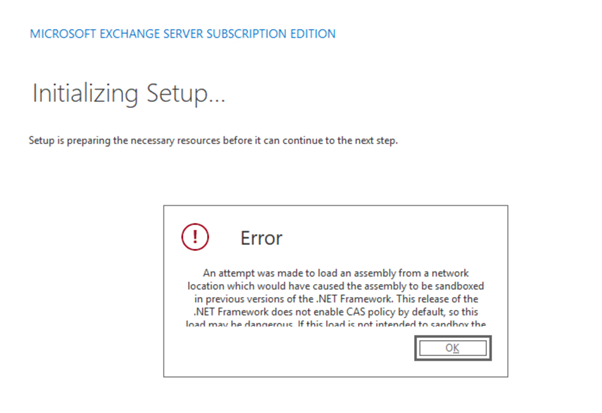
An attempt was made to load an assembly from a network location which would have caused the assembly to be sandboxed in previous versions of the .NET Framework.
This release of the .NET Framework does not enable CAS policy by default, so this load may be dangerous
- MS SRV 2025
- Exchange Subscription Edition RTM ISO download from MS and 7zip extracted
- Windows Defender no third party AV
We have been in the process of installation a Exchange SE DAG Setup for a swing migration from 2016.
- Downloaded the Exchange SE ISO
- unpacked with 7zIP
- Installed the first node
- Copied over the unpacked directory to the other server so we don’t have to install from a share which is newer a good idea for such sensitive installations (MSI)
- Wanted to install the second node the exact 1:1 way but did got an error
Error: An attempt was made to load an assembly from a network location which would have caused the assembly to be sandboxed in previous versions of the .NET Framework. This release of the .NET Framework does not enable CAS policy by default, so this load may be dangerous
First I thought I can’t see that it is remote share, tried a second time because that what the error tells you. Translated: Do not install complex software that is Windows Installer based from a) Share b) Desktop c) Media that will change or get migrated > Best practice always copy it to local media. Windows Installer has a cache to help people who don’t’ understand why and think to know it better.
But…
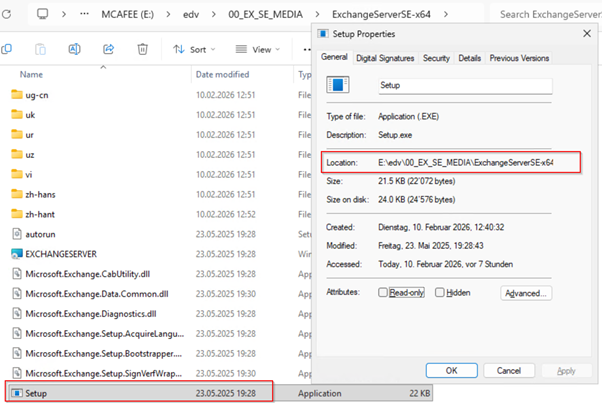
I check again and it was from the local path. during the Setup.exe of the Exchange MS seems to flag some files or Directory special or with a certain attribute.
I found some info’s but none of this was true. We wait with complex security Suite like Trellix ENS and leave Defender on the server for ms products until the server is ready for production.
.NET Tech Learn says:
In .NET Framework 4.x Microsoft changed the default behaviour:
- Older .NET versions used CAS (Code Access Security).
- Assemblies loaded from network locations were automatically sandboxed (restricted permissions).
- Starting with .NET 4, CAS is disabled by default.
- Because of that, .NET now blocks loading assemblies that look like they come from remote or untrusted sources, instead of silently sandboxing them.
Yes nice, we have are devs now to install exchange? Do we have to install VS Code, open a GitHub repo and use Copilot to debug setup.exe?
The real root causes (most common in enterprise setups)
From real-world cases:
- ZIP downloaded → copied to server → extracted → blocked DLLs (No none has a file lock)
- Files copied from network share instead of local disk (NO)
- Robocopy preserving alternate streams (NO was not used)
- Antivirus or file transfer tool preserving MOTW (No as mentioned we for Setup use Defender for MS products an then install Trellix ENS at later stage)
- Installer executed directly from share (NO)
We traced the open files and it was not some .NET Framework Realtime runtime access to source DLL from the Source. (DLL Lock)
SOLUTION:
The only solution was to copy over the ISO and extract all again with 7ZIP or any other packer you use on the Next DAG node you install.