

 Click on the Category button to get more articles regarding that product.
Import Module Exchange Online | M365 | Hybrid

This guide explains how to import and connect the Exchange Online PowerShell module, and how Microsoft Entra Conditional Access policies such as MFA, legacy authentication blocking, device compliance, and sign-in restrictions can prevent successful connections.
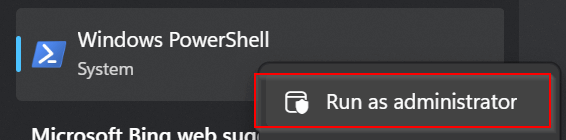
Start PowerShell Elevated

Mouse right click on Windows PowerShell (this may prompt for Local Administrator account if you don’t have Local Admin permission)
Install (If you did not before)
Install-Module ExchangeOnlineManagement -Scope CurrentUser

or

Install-Module ExchangeOnlineManagement -Scope CurrentUser –Force
Import
Import-Module ExchangeOnlineManagement

Connect
Connect-ExchangeOnline
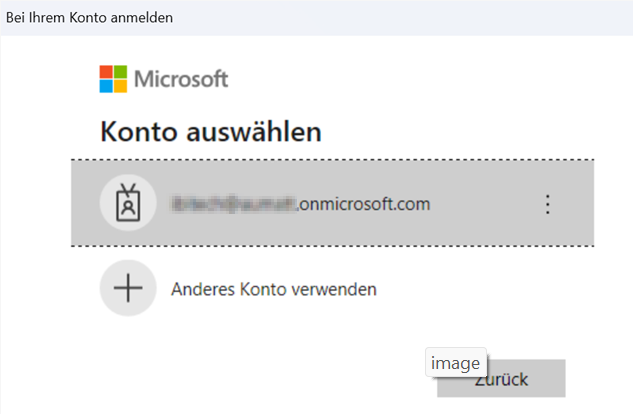
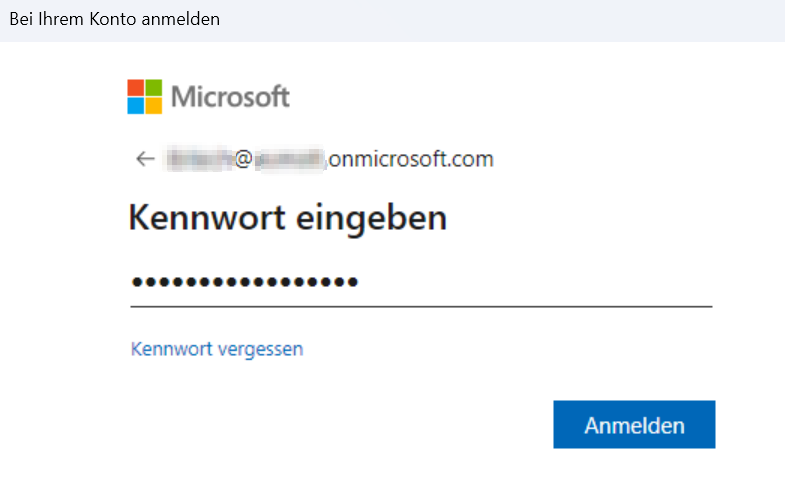

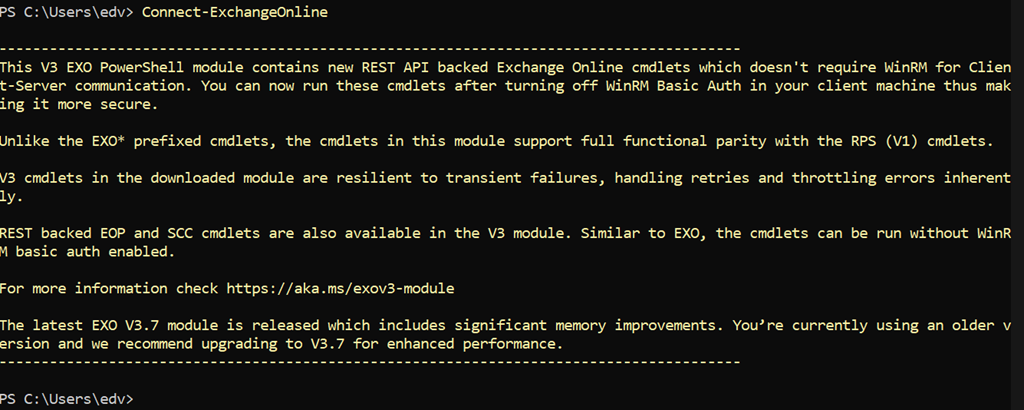
or direct with account
Connect-ExchangeOnline -UserPrincipalName admin@domain.com
Verify
Get-Command -Module ExchangeOnlineManagement
Get-Command -Module ExchangeOnlineManagement

CommandType     Name                                               Version    Source
-----------     ----                                               -------    ------
Function        Connect-ExchangeOnline                             3.5.1      ExchangeOnlineManagement
Function        Connect-IPPSSession                                3.5.1      ExchangeOnlineManagement
Function        Disconnect-ExchangeOnline                          3.5.1      ExchangeOnlineManagement
Function        Get-WrappedCommand                                 3.5.1      ExchangeOnlineManagement
Function        IsCloudShellEnvironment                            3.5.1      ExchangeOnlineManagement
Function        UpdateImplicitRemotingHandler                      3.5.1      ExchangeOnlineManagement
Cmdlet          Add-VivaModuleFeaturePolicy                        3.5.1      ExchangeOnlineManagement
Cmdlet          Get-ConnectionInformation                          3.5.1      ExchangeOnlineManagement
Cmdlet          Get-DefaultTenantBriefingConfig                    3.5.1      ExchangeOnlineManagement
Cmdlet          Get-DefaultTenantMyAnalyticsFeatureConfig          3.5.1      ExchangeOnlineManagement
Cmdlet          Get-EXOCasMailbox                                  3.5.1      ExchangeOnlineManagement
Cmdlet          Get-EXOMailbox                                     3.5.1      ExchangeOnlineManagement
Cmdlet          Get-EXOMailboxFolderPermission                     3.5.1      ExchangeOnlineManagement
Cmdlet          Get-EXOMailboxFolderStatistics                     3.5.1      ExchangeOnlineManagement
Cmdlet          Get-EXOMailboxPermission                           3.5.1      ExchangeOnlineManagement
Cmdlet          Get-EXOMailboxStatistics                           3.5.1      ExchangeOnlineManagement
Cmdlet          Get-EXOMobileDeviceStatistics                      3.5.1      ExchangeOnlineManagement
Cmdlet          Get-EXORecipient                                   3.5.1      ExchangeOnlineManagement
Cmdlet          Get-EXORecipientPermission                         3.5.1      ExchangeOnlineManagement
Cmdlet          Get-MyAnalyticsFeatureConfig                       3.5.1      ExchangeOnlineManagement
Cmdlet          Get-UserBriefingConfig                             3.5.1      ExchangeOnlineManagement
Cmdlet          Get-VivaFeatureCategory                            3.5.1      ExchangeOnlineManagement
Cmdlet          Get-VivaInsightsSettings                           3.5.1      ExchangeOnlineManagement
Cmdlet          Get-VivaModuleFeature                              3.5.1      ExchangeOnlineManagement
Cmdlet          Get-VivaModuleFeatureEnablement                    3.5.1      ExchangeOnlineManagement
Cmdlet          Get-VivaModuleFeaturePolicy                        3.5.1      ExchangeOnlineManagement
Cmdlet          Remove-VivaModuleFeaturePolicy                     3.5.1      ExchangeOnlineManagement
Cmdlet          Set-DefaultTenantBriefingConfig                    3.5.1      ExchangeOnlineManagement
Cmdlet          Set-DefaultTenantMyAnalyticsFeatureConfig          3.5.1      ExchangeOnlineManagement
Cmdlet          Set-MyAnalyticsFeatureConfig                       3.5.1      ExchangeOnlineManagement
Cmdlet          Set-UserBriefingConfig                             3.5.1      ExchangeOnlineManagement
Cmdlet          Set-VivaInsightsSettings                           3.5.1      ExchangeOnlineManagement
Cmdlet          Update-VivaModuleFeaturePolicy                     3.5.1      ExchangeOnlineManagement
Disconnect
Disconnect-ExchangeOnline
If it fails keep in mind that the Tenant owner MAY not allow you to connect from where you try (IP-location/country/Provider etc.)
- Conditional Access policies are enforced after first-factor authentication and can block PowerShell sessions if the session doesn’t meet policy criteria (e.g., compliant device, session control).
- Blocking legacy authentication via Conditional Access means older PowerShell/remote sessions may fail — use the modern EXO module instead.
- You can target specific cloud apps or resource actions (including Exchange Online) to tailor how CA affects PowerShell connections.
Links if it fails:
Microsoft Entra Conditional Access – overview and configuration
https://learn.microsoft.com/en-us/entra/identity/conditional-access/
Block legacy authentication with Conditional Access
https://learn.microsoft.com/en-us/entra/identity/conditional-access/policy-block-legacy-authentication
Conditional Access conditions (device, location, client app, session controls)
https://learn.microsoft.com/en-us/entra/identity/conditional-access/concept-conditional-access-conditions
Connect to Exchange Online PowerShell (modern authentication, MFA)
https://learn.microsoft.com/en-us/powershell/exchange/connect-to-exchange-online-powershell?view=exchange-ps
Security Defaults and their impact on legacy authentication
https://learn.microsoft.com/en-us/entra/fundamentals/security-defaults
Conditional Access targeting cloud apps (Exchange Online scope)
https://learn.microsoft.com/en-us/entra/identity/conditional-access/concept-conditional-access-cloud-apps
Conditional Access sign-in logs (troubleshooting blocked connections)
https://learn.microsoft.com/en-us/entra/identity/monitoring-health/concept-sign-ins