

 Click on the Category button to get more articles regarding that product.
Full Guide to SignTool — With a Better, Fully Automatic Alternative if you just want to verify signatures
If you’re searching for SignTool, chances are you want to verify, sign, timestamp, or inspect digital signatures on executable files.
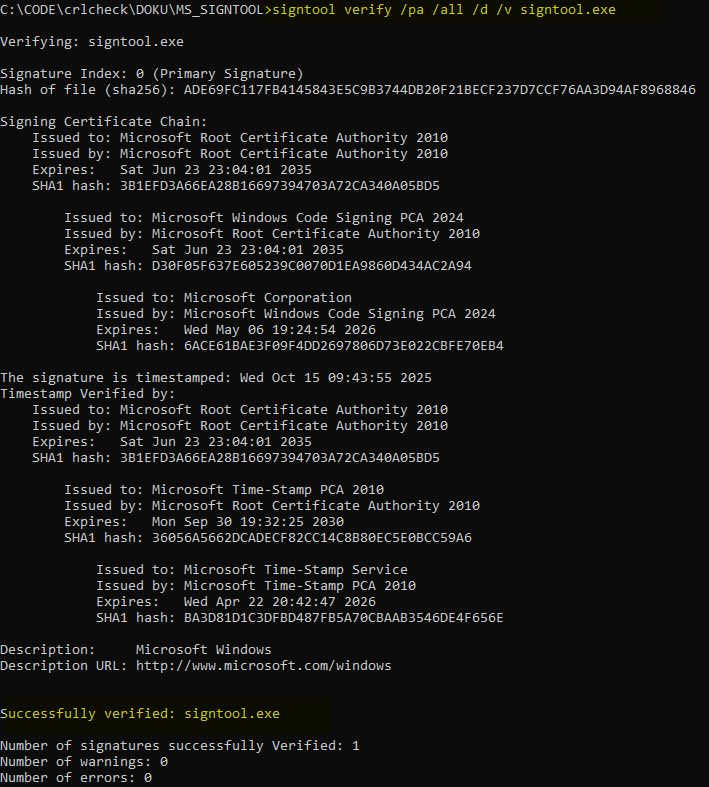
Output from: signtool.exe verify /pa /all /d signtool.exe
Before we dive into all the common signtool.exe commands and options, here’s the better starting point for most real-world needs if you JUST want to verify digital signatures.
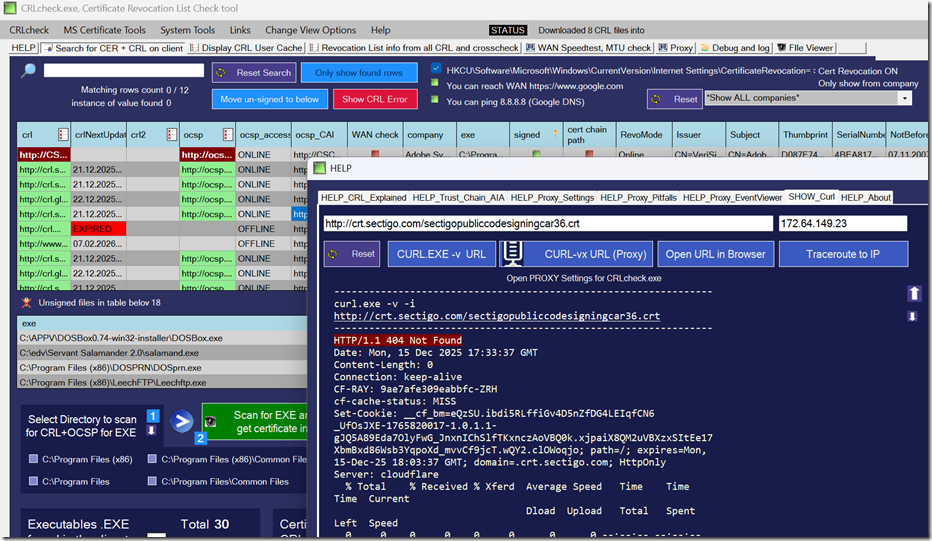
CRLcheck.exe — our free, fully automatic signature verification tool — scans every executable on a client machine, checks digital trust and status using the same Windows trust mechanisms as SignTool, and outputs a clear table of results with many inspection and automation options. It does all this without manual command lines and works on whole systems, not just single files.
For quick single-file checks, administrators and developers still use SignTool, so below is a complete, reorganized reference of all key commands and options it supports.
Global Options
| Option | What It Does |
|---|---|
/q |
Quiet mode — minimal or no output on success |
/v |
Verbose mode — detailed output and warnings |
/debug |
Print debug information |
1) Catalog Database Commands (catdb)
| Option | Meaning |
|---|---|
/d |
Update the default catalog database |
/g GUID |
Update the catalog database identified by GUID |
/r |
Remove the specified catalog from the database |
/u |
Generate a unique name when adding a catalog |
2) Removing Signatures (remove)
| Option | Meaning |
|---|---|
/c |
Remove all certificates except signer |
/s |
Remove signature entirely |
/u |
Remove unauthenticated attributes (timestamps etc.) |
/q |
Quiet output |
/v |
Verbose output |
3) Signing Files (sign)
/fd digest algorithm (e.g., SHA256) or signing will fail.| Option | What It Does |
|---|---|
/a |
Selects the best available signing certificate |
/ac file |
Add another certificate to the signature |
/as |
Append an additional signature |
/csp CSPName |
Specify a crypto service provider |
/d description |
Set signed content description |
/dg /ds /di Path |
Digest generation and signature processing flags |
/dlib DLL |
Use a custom digest-signing DLL |
/dmdf Filename |
Pass unmodified content for digest signing |
/du URL |
URL for expanded description |
/dxml |
Output XML for digest |
/f file |
Use certificate from file (e.g., PFX) |
/fd alg |
Digest algorithm (e.g., SHA256) |
/i issuer |
Only use certificates matching issuer name |
/kc container |
Private key container name |
/n name |
Only use certificates matching subject name |
/nph |
Suppress page hashes (when supported) |
/p password |
Password for PFX file |
/p7 path |
Output a PKCS#7 file |
/p7ce & /p7co |
PKCS#7 configuration options |
/ph |
Generate page hashes |
/r rootname |
Force root certificate chain name |
/s store |
Certificate store to search |
/sha1 hash |
Use explicit SHA1 hash to pick a certificate |
/sm |
Use machine store |
/t URL |
Timestamp URL |
/tr URL |
RFC 3161 timestamp URL |
/td alg |
Digest algorithm for RFC 3161 timestamp |
/u |
Restrict to signing usage |
/uw |
Use Windows System Component Verification |
4) Time Stamping (timestamp)
| Option | Meaning |
|---|---|
/p7 |
Time stamp PKCS#7 files |
/t URL |
Time stamp server URL |
/tr URL |
RFC 3161 time stamp server URL |
/td alg |
Digest algorithm for timestamp |
/tp index |
Apply timestamp to specific signature index |
5) Verifying Signatures (verify)
| Option | What It Means |
|---|---|
/a |
Use all verification methods (catalog + embedded) |
/ad |
Find catalog in default database |
/all |
Verify every signature in a multi-signed file |
/as |
Use system component (driver) catalog |
/ag CatDBGUID |
Search catalog by GUID |
/c CatFile |
Specify catalog file |
/d |
Print description/URL |
/ds index |
Verify a specific signature index |
/hash {SHA1|SHA256} |
Verify by specific hash |
/kp |
Use kernel-mode driver signing policy |
/ms |
Multiple verification semantics |
/o Version |
Verify for specific OS version |
/p7 |
Verify PKCS#7 files |
/pa |
Use Default Authentication Policy |
/pg PolicyGUID |
Use custom policy GUID |
/ph |
Print & verify page hashes |
/r RootSubjectName |
Chain to specific root |
/tw |
Warn if no timestamp present |
This is exactly why CRLcheck.exe exists: it automatically scans every executable on a system, validates all signatures, handles catalogs and timestamps, and outputs a structured trust table — no scripting required. It’s the ideal solution when manual SignTool commands aren’t enough.
signtool.exe verify /pa signtool.exe
File: signtool.exe
Index Algorithm Timestamp
========================================
0 sha256 RFC3161
signtool.exe verify /pa /all /d /v signtool.exe
c:\edv\MS_SIGNTOOL>signtool verify /pa /all /d /v signtool.exe

Verifying: signtool.exe

Signature Index: 0 (Primary Signature)
Hash of file (sha256): ADE69FC117FB4145843E5C9B3744DB20F21BECF237D7CCF76AA3D94AF8968846

Signing Certificate Chain:
    Issued to: Microsoft Root Certificate Authority 2010
    Issued by: Microsoft Root Certificate Authority 2010
    Expires:   Sat Jun 23 23:04:01 2035
    SHA1 hash: 3B1EFD3A66EA28B16697394703A72CA340A05BD5

        Issued to: Microsoft Windows Code Signing PCA 2024
        Issued by: Microsoft Root Certificate Authority 2010
        Expires:   Sat Jun 23 23:04:01 2035
        SHA1 hash: D30F05F637E605239C0070D1EA9860D434AC2A94

            Issued to: Microsoft Corporation
            Issued by: Microsoft Windows Code Signing PCA 2024
            Expires:   Wed May 06 19:24:54 2026
            SHA1 hash: 6ACE61BAE3F09F4DD2697806D73E022CBFE70EB4

The signature is timestamped: Wed Oct 15 09:43:55 2025
Timestamp Verified by:
    Issued to: Microsoft Root Certificate Authority 2010
    Issued by: Microsoft Root Certificate Authority 2010
    Expires:   Sat Jun 23 23:04:01 2035
    SHA1 hash: 3B1EFD3A66EA28B16697394703A72CA340A05BD5

        Issued to: Microsoft Time-Stamp PCA 2010
        Issued by: Microsoft Root Certificate Authority 2010
        Expires:   Mon Sep 30 19:32:25 2030
        SHA1 hash: 36056A5662DCADECF82CC14C8B80EC5E0BCC59A6

            Issued to: Microsoft Time-Stamp Service
            Issued by: Microsoft Time-Stamp PCA 2010
            Expires:   Wed Apr 22 20:42:47 2026
            SHA1 hash: BA3D81D1C3DFBD487FB5A70CBAAB3546DE4F656E

Description:     Microsoft Windows
Description URL: http://www.microsoft.com/windows


Successfully verified: signtool.exe

Number of signatures successfully Verified: 1
Number of warnings: 0
Number of errors: 0
Successfully verified: signtool.exe
LINK MS:
https://learn.microsoft.com/en-us/windows/win32/seccrypto/using-signtool-to-verify-a-file-signature
Download CRLcheck freeware
Where to download the signtool.exe itself:
1. Download the Installer
Visit the official Windows SDK Downloads page.
Download the installer for the latest version. For most general development in early 2026, you should use Windows SDK 10.0.26100.x.
Note: An early-release SDK (version 10.0.28000.1) is also available for developers preparing for the next-generation OS release.
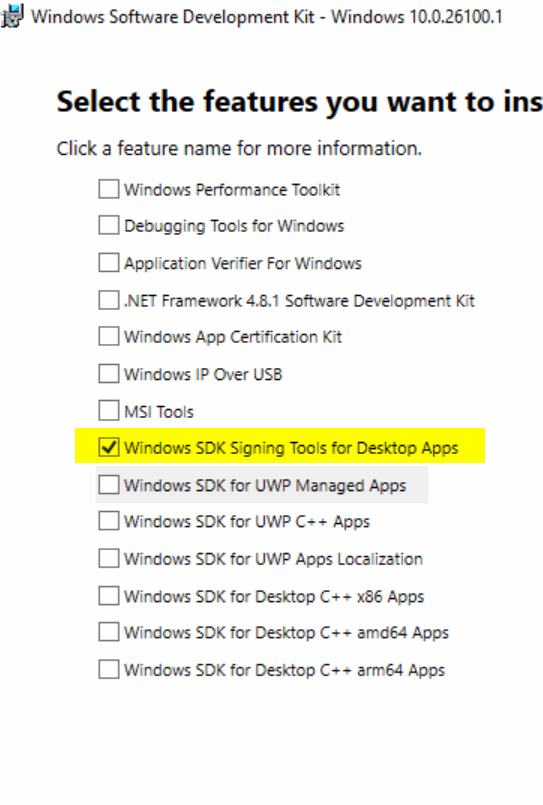
2. Select the “Signing Tools” Feature
During the installation process, you do not need to install the entire 3GB+ SDK. In the “Select the features you want to install” dialog, check only:
Windows SDK Signing Tools for Desktop Apps.
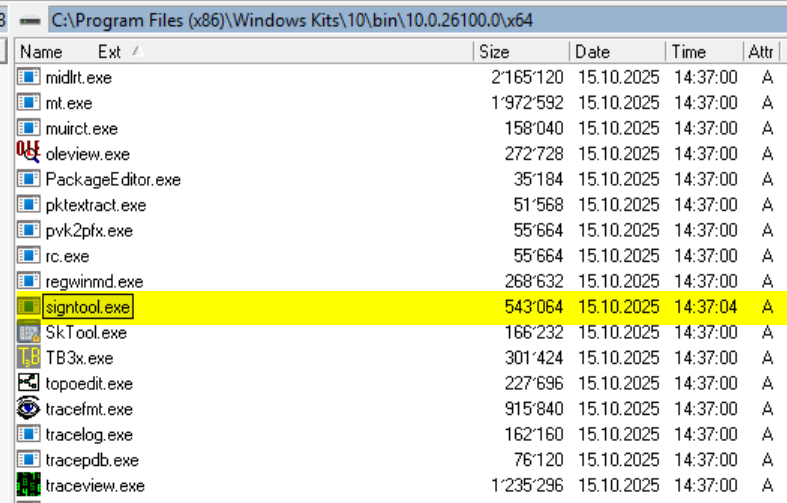
3. Locate the Executable
Once installed, signtool.exe is placed in a versioned subfolder. The default path on a 64-bit system is:
C:\Program Files (x86)\Windows Kits\10\bin\<Version Number>\x64\signtool.exe.
Example for the 2026 stable release:
C:\Program Files (x86)\Windows Kits\10\bin\10.0.26100.0\x64\signtool.exe
Another way to download:
- Open a web browser in https://learn.microsoft.com/en-us/windows/win32/seccrypto/signtool
- Click the Windows Software Development Kit (SDK) link
- Click Download the installer.
- Complete the steps of the installation wizard. In the Select the features you want install dialog, you only need to check the Windows SDK Signing Tools for Desktop Apps box.
Some Keywords we use in IT for this issue or process:
certificate revocation list check
Certutil URL Retrieval Tool
Certificate revocation list example
Certutil verify certificate
Certificate revocation List vs OCSP
URL Retrieval Tool download
What is crl in cyber security