
 Click on the Category button to get more articles regarding that product.
Script to identify you Office version and if affected.

Outlook replaces accented and extended characters with question marks
problem:
When you write extended characters in an email, you may find that they display as question marks.
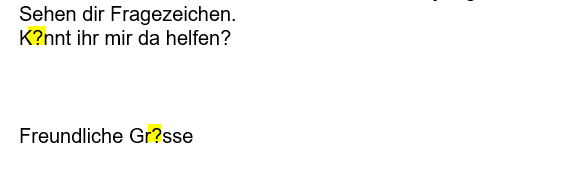
https://support.microsoft.com/en-au/office/classic-outlook-replaces-accented-and-extended-characters-with-question-marks-c1fdb067-38ca-464a-bcb1-bd657a85e1d3
What we know:
- 100% Outlook, Office 365 problem side
- This is NOT an Exchange on-premise or Exchange Online/M365/Tenant problem
- The workaround in the GUI settings ONLY works for E-Mails it does not work for Calendar / appointment
Some examples that we have seen reported include registered trademark (®), accented characters (é, ü, ñ, etc.), pound currency (£), umlauts (¨ over a letter), and other Non-ASCII Symbols.
From the feedback so far, this issue is occurring in Version 2601 (Build 19628.20150+).
Remark: It is unclear if they mean 20150 and until latest release with the + sign?
19.02.2026 STATUS: INVESTIGATING
The Outlook Team is investigating this issue. We will update this topic as soon as we know more information.
WORKAROUND
Workaround #1
Use Outlook Web Access (OWA) or New Outlook
Workaround #2
If you urgently need to work in classic Outlook, you can revert to the prior version and verify if that addresses the issue.
To revert to the prior Version 2512 (Build 19530.20184).
Open a Command Prompt in Administrator context.
Type or paste the command below into the Command Prompt window and press Enter:
“%programfiles%\Common Files\Microsoft Shared\ClickToRun\officec2rclient.exe” /update user updatetoversion=16.0.19530.20184
To prevent Office updating back to the latest build, you can turn off updates by selecting File > Office Account > Update Options > Disable Updates.
Put a reminder on your calendar for March 10th to re-enable updates. Or check back on this Known Issue in case it is addressed sooner.
Workaround #3
Disable Outlook automatically selecting the encoding for outgoing messages
Select File > Options > Advanced.
Under International Options, uncheck Automatically select encoding for outgoing messages.
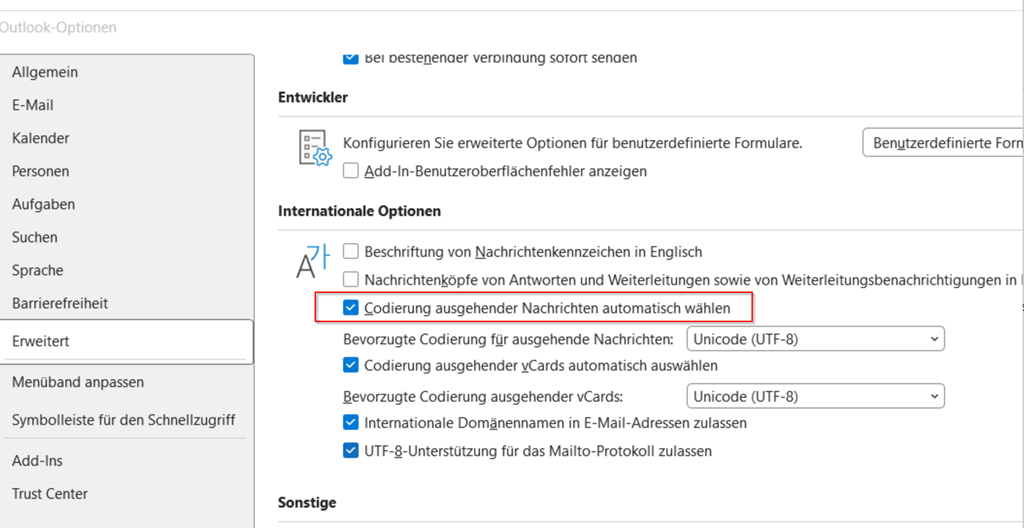
Put a reminder on your calendar for March 10th to re-enable this setting. Or check back on this Known Issue in case it is addressed sooner.
The script enumerates all Microsoft Office installations (Click-to-Run and MSI/Volume) and displays the following fields:
- InstallType – Click-to-Run or MSI/Volume.
- Version – official Office version (VersionToReport for Perpetual/Volume builds).
- Build – client-reported build (ClientVersionToReport).
- UpdateChannel – channel name (Monthly, SemiAnnual, etc.) or PerpetualVL / Volume.
- Interval – human-readable update frequency (Monthly, 6-Month cycle, or manual).
- InstallPath – installation folder path.
- UmlautBugRisk – flags potential Outlook Umlaut/accents bug for builds older than 16.0.14326; otherwise No.
Remark: We are unsure with what MS means with Version 2601 (Build 19628.20150+) and the + PLUS all above that version until which one?
# ===============================
# V1.0, 19.02.2026, www.butsch.ch, for David and Gilles
# Remark: We are unsure with what MS means with Version 2601 (Build 19628.20150+) and the + PLUS all above that version until which one?
# Script: Get-officeopdateinfo.ps1
# Purpose: List all Office installations with Version, Build, Channel, readable Update Interval
#          and flag potential Outlook Umlaut/accents bug
# Works for: Click-to-Run and MSI/Volume installs, including Perpetual/Volume builds
# ===============================

$paths = @(
    "HKLM:\SOFTWARE\Microsoft\Office\ClickToRun\Configuration",
    "HKLM:\SOFTWARE\WOW6432Node\Microsoft\Office\ClickToRun\Configuration",
    "HKLM:\SOFTWARE\Microsoft\Office\16.0\Common\InstallRoot",
    "HKLM:\SOFTWARE\WOW6432Node\Microsoft\Office\16.0\Common\InstallRoot"
)

$results = @()

# Fixed version where the Umlaut bug was resolved
$fixedVersion = [version]"16.0.14326.0"

foreach ($path in $paths) {
    if (Test-Path $path) {
        $props = Get-ItemProperty -Path $path

        # Click-to-Run Office
        if ($props.PSObject.Properties.Name -contains "ClientVersionToReport") {

            if ($props.PSObject.Properties.Name -contains "ProductReleaseIds" -and
                $props.ProductReleaseIds -like "*Volume*") {

                $channel = "PerpetualVL / Volume"

                # Use VersionToReport if exists, else ClientVersionToReport
                $version = if ($props.PSObject.Properties.Name -contains "VersionToReport") {
                    $props.VersionToReport
                } else {
                    $props.ClientVersionToReport
                }

                $build = $props.ClientVersionToReport
                $interval = "No fixed cycle / Manual updates"

            } else {
                # Normal Click-to-Run with real channel
                $channel = $props.UpdateChannel
                $version = $props.DisplayVersion
                $build = $props.ClientVersionToReport

                switch ($channel) {
                    "Monthly"                { $interval = "Monthly" }
                    "Current"                { $interval = "Monthly" }
                    "MonthlyEnterprise"      { $interval = "Monthly (Enterprise-tested)" }
                    "SemiAnnual"             { $interval = "6-Month cycle (Jan/Jul)" }
                    "SemiAnnualTargeted"     { $interval = "6-Month cycle, early test (1 month early)" }
                    default                  { $interval = "Unknown" }
                }
            }

            # ---- Flag potential Umlaut bug ----
            # Only flag builds older than the fixed version
            $checkVersion = [version]$version
            if ($checkVersion -lt $fixedVersion) {
                $umlautBug = "BUG Umlaut = YES"
            } else {
                $umlautBug = "No"
            }

            $results += [PSCustomObject]@{
                InstallType    = "Click-to-Run"
                Version        = $version
                Build          = $build
                UpdateChannel  = $channel
                Interval       = $interval
                InstallPath    = $props.InstallationPath
                UmlautBugRisk  = $umlautBug
            }
        }

        # MSI / Volume Office
        elseif ($props.PSObject.Properties.Name -contains "Version") {

            $version = $props.Version
            $build = $null
            $channel = "Perpetual / Volume"
            $interval = "No fixed cycle / Manual updates"

            # Flag all MSI/Volume builds older than fixed version
            $checkVersion = if ($props.PSObject.Properties.Name -contains "Version") {
                [version]$props.Version
            } else {
                $fixedVersion  # default safe
            }

            $umlautBug = if ($checkVersion -lt $fixedVersion) { "BUG Umlaut = YES" } else { "No" }

            $results += [PSCustomObject]@{
                InstallType    = "MSI/Volume"
                Version        = $version
                Build          = $build
                UpdateChannel  = $channel
                Interval       = $interval
                InstallPath    = $props.Path
                UmlautBugRisk  = $umlautBug
            }
        }
    }
}

# Output results in a clean table
$results | Format-Table -AutoSize
Office versions we have as example at a customer. MS says in their KB. We are unsure to date what they mean with + all version 19628.20150 to the latest?
From the feedback so far, this issue is occurring in Version 2601 (Build 19628.20150+).
Office 16 Click-to-Run Extensibility Component	VERSION: 16.0.10417.20020; PUBLISHER: Microsoft Corporation	Software(32-Bit)
Office 16 Click-to-Run Extensibility Component	VERSION: 16.0.10417.20095; PUBLISHER: Microsoft Corporation	Software(32-Bit)
Office 16 Click-to-Run Extensibility Component	VERSION: 16.0.10417.20095; PUBLISHER: Microsoft Corporation	Software(64-Bit)
Office 16 Click-to-Run Extensibility Component	VERSION: 16.0.18827.20102; PUBLISHER: Microsoft Corporation	Software(64-Bit)

From the feedback so far, this issue is occurring in Version 2601 (Build 19628.20150+).
Office 16 Click-to-Run Extensibility Component	VERSION: 16.0.19127.20154; PUBLISHER: Microsoft Corporation	Software(32-Bit)

These we know they had the problem below in red:
Office 16 Click-to-Run Extensibility Component	VERSION: 16.0.19426.20170; PUBLISHER: Microsoft Corporation	Software(64-Bit)
Office 16 Click-to-Run Extensibility Component	VERSION: 16.0.19426.20170; PUBLISHER: Microsoft Corporation	Software(64-Bit)
Office 16 Click-to-Run Extensibility Component	VERSION: 16.0.19426.20170; PUBLISHER: Microsoft Corporation	Software(64-Bit)
Office 16 Click-to-Run Extensibility Component	VERSION: 16.0.19426.20170; PUBLISHER: Microsoft Corporation	Software(64-Bit)
Office 16 Click-to-Run Extensibility Component	VERSION: 16.0.19426.20170; PUBLISHER: Microsoft Corporation	Software(64-Bit)
Office 16 Click-to-Run Extensibility Component	VERSION: 16.0.19426.20170; PUBLISHER: Microsoft Corporation	Software(64-Bit)
Office 16 Click-to-Run Extensibility Component	VERSION: 16.0.19426.20170; PUBLISHER: Microsoft Corporation	Software(64-Bit)
Office 16 Click-to-Run Extensibility Component	VERSION: 16.0.19426.20170; PUBLISHER: Microsoft Corporation	Software(64-Bit)
Office 16 Click-to-Run Extensibility Component	VERSION: 16.0.19426.20170; PUBLISHER: Microsoft Corporation	Software(64-Bit)
Office 16 Click-to-Run Extensibility Component	VERSION: 16.0.19426.20170; PUBLISHER: Microsoft Corporation	Software(64-Bit)
Office 16 Click-to-Run Extensibility Component	VERSION: 16.0.19426.20170; PUBLISHER: Microsoft Corporation	Software(64-Bit)

Office 16 Click-to-Run Extensibility Component	VERSION: 16.0.19628.20204; PUBLISHER: Microsoft Corporation	Software(64-Bit)
Office 16 Click-to-Run Extensibility Component	VERSION: 16.0.19628.20204; PUBLISHER: Microsoft Corporation	Software(64-Bit)
Office 16 Click-to-Run Extensibility Component	VERSION: 16.0.19628.20204; PUBLISHER: Microsoft Corporation	Software(64-Bit)
Office 16 Click-to-Run Extensibility Component	VERSION: 16.0.19628.20204; PUBLISHER: Microsoft Corporation	Software(64-Bit)
Office 16 Click-to-Run Extensibility Component	VERSION: 16.0.19628.20204; PUBLISHER: Microsoft Corporation	Software(64-Bit)
Office 16 Click-to-Run Extensibility Component	VERSION: 16.0.19628.20204; PUBLISHER: Microsoft Corporation	Software(64-Bit)
Office 16 Click-to-Run Extensibility Component	VERSION: 16.0.19628.20204; PUBLISHER: Microsoft Corporation	Software(64-Bit)
Office 16 Click-to-Run Extensibility Component	VERSION: 16.0.19628.20204; PUBLISHER: Microsoft Corporation	Software(64-Bit)
Office 16 Click-to-Run Extensibility Component	VERSION: 16.0.19628.20204; PUBLISHER: Microsoft Corporation	Software(64-Bit)
Office 16 Click-to-Run Extensibility Component	VERSION: 16.0.19628.20204; PUBLISHER: Microsoft Corporation	Software(64-Bit)
Office 16 Click-to-Run Extensibility Component	VERSION: 16.0.19628.20204; PUBLISHER: Microsoft Corporation	Software(64-Bit)
Office 16 Click-to-Run Extensibility Component	VERSION: 16.0.19628.20204; PUBLISHER: Microsoft Corporation	Software(64-Bit)
Office 16 Click-to-Run Extensibility Component	VERSION: 16.0.19628.20204; PUBLISHER: Microsoft Corporation	Software(64-Bit)
Office 16 Click-to-Run Extensibility Component	VERSION: 16.0.19628.20204; PUBLISHER: Microsoft Corporation	Software(64-Bit)
Office 16 Click-to-Run Extensibility Component	VERSION: 16.0.19628.20204; PUBLISHER: Microsoft Corporation	Software(64-Bit)
Office 16 Click-to-Run Extensibility Component	VERSION: 16.0.19628.20204; PUBLISHER: Microsoft Corporation	Software(64-Bit)
Office 16 Click-to-Run Extensibility Component	VERSION: 16.0.19628.20204; PUBLISHER: Microsoft Corporation	Software(64-Bit)
Office 16 Click-to-Run Extensibility Component	VERSION: 16.0.19628.20214; PUBLISHER: Microsoft Corporation	Software(64-Bit)
Update history for Office 2016 C2R and Office 2019 – Office release notes | Microsoft Learn
https://learn.microsoft.com/en-us/officeupdates/update-history-office-2019