Category: Deployment

APPV How to call a script/batch FROM within the APPV bubble

Insert following Text as example into the Filename.OSD to run a script from wtihin the APPV package After:  </IMPLEMENTATION> <DEPENDENCY>  <CLIENTVERSION VERSION=”4.6.0.0″/>    <SCRIPT EVENT=”LAUNCH” TIMING=”PRE” TIMEOUT=”0″ PROTECT=”TRUE” ABORTRESULT=”-1″ SUCCESSRESULT=”1″ EXTERN=”TRUE”>       <SCRIPTBODY>@call \\\\apv01\\scripts$\\pabs\\check.cmd \n </SCRIPTBODY>      <SCRIPTBODY>if exist “C:\Program Files (x86)\Pabsnet\pabs.exe” (exit 0) else exit 1 </SCRIPTBODY>    </SCRIPT> </DEPENDENCY>    

HP biosconfigutility.exe and password in BIOS options, error 10

HP this is absolue confusing! Not all syntax provided in the “Biosconfigutlity.exe” seem to work in a certain order! Here is the correct syntax and a working example under Windows PE 3.X 32BIT boot media: Biosconfigutlity.exe /cspwd:”youroldbiospassword” /cspws:”yournewbiospassword” And an example to renew the existing BIOS password and write new BIOS Setting in one command: […]

Enteo/Frontrange V7.X Debug Level setzen

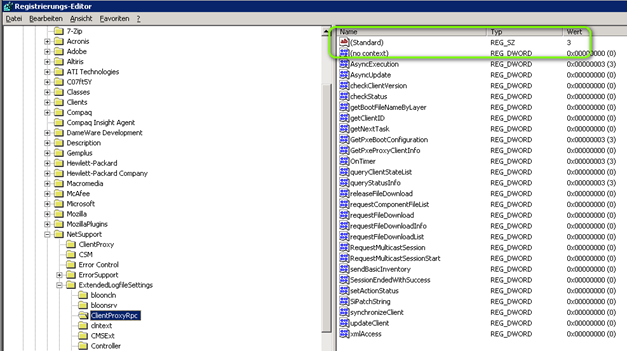
Hier die Optionen setzen: z.B. fuer den PROXY HKEY_LOCAL_MACHINE\SOFTWARE\NetSupport\ExtendedLogfileSettings\ClientProxyRpc\Standard Default Wert: 3 Viel: 0 Debug Logfiles auf dem Enteo Server verwendet und deren Pfade: “C:\Programme\Gemeinsame Dateien\enteo\NiLogs\BLS\bls_ClientWebService.log” “C:\Programme\Gemeinsame Dateien\enteo\NiLogs\ClientProxy\ClientProxyRpcCli ent(***CLIENTID****)_SYSTEM_AGG.log” “C:\Programme\Gemeinsame Dateien\enteo\NiLogs\BLS\bls_ClientWebService.log” Zum Beispiel verwendet um Fehler bei Authentication mit Enteo Konten: Beim BLS war ein ADS-Konto, dass wir verwendeten von einem First Level deaktiviert worden. […]

Internet Explorer 10 (IE10) for Windows 7 (WIN7), download and block Auto install

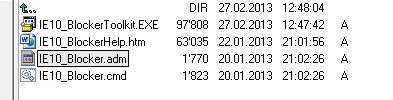
  Download IE10 for Windows 7, http://windows.microsoft.com/en-us/internet-explorer/downloads/ie-10/worldwide-languages Block IE10 on all system which are NOT connected to Windows Update Server WSUS, http://www.microsoft.com/en-us/download/details.aspx?id=36512   Notes in German from the field: Kommt nicht automatisch WENN WSUS Anbindung vorhanden Kommt automatisch bei allen kleinen Kunden die KEIN WSUS haben da gestuft als “important Update”   Toolkit to Disable […]

ODBCCONF.exe command line tool for generating ODBC Entry

ODBCCONF.exe is a command-line tool that allows you to configure ODBC drivers and data source names. http://msdn.microsoft.com/en-us/library/ee388579(VS.85).aspx ODBCConf ConfigSysDSN “SQL Server” “DSN=LocalODBCConnection|SERVER=(local)” for MySQLODBCConf ConfigSysDSN “MySQL” “DSN=LocalODBCConnection|SERVER=MySQL_ServerName” To get the correct Connection String for your DB reference this site: http://www.connectionstrings.com/ Do understand the difference between SYSTEM and USER DNS: http://digital.ni.com/public.nsf/allkb/852559036FB6447380256ADF007C3964 You cant’ give over username and password for […]

Deployment: How to clear Internet Explorer 8 Temporary Files Silent

RunDll32.exe InetCpl.cpl,ClearMyTracksByProcess 8del “%USERPROFILE%\Local Settings\Temporary Internet Files\” /S /F /Q EDIT: codes for the first line (IE8 ) Code: [Select]255 (Deletes ALL History)1 (Deletes History Only)2 (Deletes Cookies Only)8 (Deletes Temporary Internet Files Only)16 (Deletes Form Data Only)32 (Deletes Password History Only)   IE7/IE8, Temporary, Roaming profile, Space