

 Click on the Category button to get more articles regarding that product.
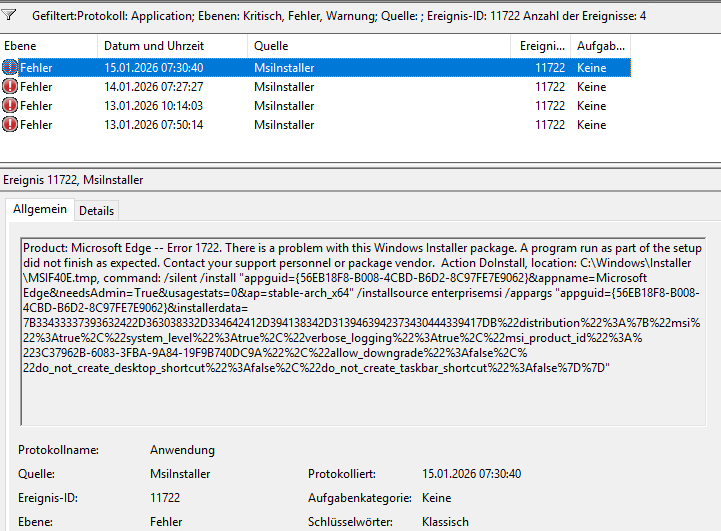
EVENT, 11722, MSIinstaller, Application
This issue keeps resurfacing, and we most commonly encounter it in customer environments running parallel systems—such as Citrix alongside VDI—but it also appears in traditional Windows desktop deployments.
Our observations suggest a strong correlation with scenarios where the same user account is actively used across multiple platforms at the same time (for example, Citrix and a local fat client session). This concurrent usage pattern introduces state conflicts that are difficult to trace and often environment-specific.
As a result, the problem tends to surface primarily in SBS or large enterprise environments rather than in smaller, single-platform setups. Troubleshooting can be particularly challenging, as the root cause is often linked to Group Policy Object (GPO) configurations that are widely misunderstood or incorrectly interpreted.
Problem:
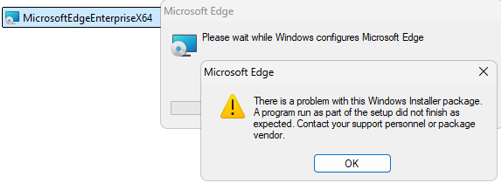
We could not update Microsoft EDGE by:
- Windows Update client (Connected to WSUS Server which daily approves certain EDGE channels)
- Manual: Download Enterprise MSI EDGE standalone Installer (Tried every channel and backward versions)
- Via Add/Remove/App repair of control panel > Finally we did see why and because of what
Solution:
We have pulled all information once again together here and show you how to solve it in detail:
| EVENT, 11722, MSIinstaller, Application |
| Product: Microsoft Edge — Error 1722. There is a problem with this Windows Installer package. A program run as part of the setup did not finish as expected. Contact your support personnel or package vendor. Action DoInstall, location: C:\Windows\Installer\MSIF40E.tmp, command: /silent /install “appguid={56EB18F8-B008-4CBD-B6D2-8C97FE7E9062}&appname=Microsoft Edge&needsAdmin=True&usagestats=0&ap=stable-arch_x64” /installsource enterprisemsi /appargs “appguid={56EB18F8-B008-4CBD-B6D2-8C97FE7E9062}&installerdata=7B33433337393632422D363038332D334642412D394138342D3139463942373430444339417DB%22distribution%22%3A%7B%22msi%22%3Atrue%2C%22system_level%22%3Atrue%2C%22verbose_logging%22%3Atrue%2C%22msi_product_id%22%3A%223C37962B-6083-3FBA-9A84-19F9B740DC9A%22%2C%22allow_downgrade%22%3Afalse%2C%22do_not_create_desktop_shortcut%22%3Afalse%2C%22do_not_create_taskbar_shortcut%22%3Afalse%7D%7D” |
Solution:
We have pulled all information once again together here and show you how to solve it in detail: