Click on the Category button to get more articles regarding that product.
PowerShell script to check if you SMB setup is 25H2 ready
Windows 11 25H2 – Small Update, Big Impact for SMB Environments
Windows 11 25H2 is now being offered on home and business systems as an Enablement Pack.
This means it’s not a full new installation — instead, it’s a small ~50 MB update that simply activates features already included in Windows 11 24H2.
Microsoft has been quietly pre-shipping most of the 25H2 components via cumulative updates over the past months.
For small business (SBS) or even enterprise environments, this makes upgrading technically simple — a real low-hanging fruit.
In fact, OEMs like HP or Dell might soon ship devices that already include Windows 11 25H2 or integrate seamlessly into Modern Workplace / Autopilot deployment workflows.
However, here’s the point we’ve always warned about:
While this type of update process can be convenient, it’s not always the right choice. There are scenarios where a traditional OS deployment (via Ivanti, SCCM, image or MDT) remains the safer and more controlled path.
If Dell or HP ships the next device with the next OS level and you are short on time you may get into real trouble. The time and cash you saved with modern OS Deployment like Autopilot > you may loose now and learn it the hard way.
Why It Can Go Wrong
The biggest potential issue we’ve seen among SBS customers is legacy SMB (Server Message Block) configurations — particularly SMBv1 still being active somewhere in the network.
This can happen due to:
- Old NAS devices or file servers still using SMBv1
- Scanners or copiers that rely on outdated SMB protocols
- External file appliances or even older Windows Server versions (like 2008 R2 / 2012)
Microsoft has tried to automate the handling/need of SMB 1.X with an option you will see on OS uplift systems.
But on an updated system not from OS-Deployment scratch W10 > W11 > W11 (Which works perfect so we will see more often)
If you start “Turn Windows Features on or off” from a cmd.exe box with “optionalfeatures”
You see SMB 1.0/CIFS File Sharing Support and Automatic Removal option

You can read “SMBv1 not installed by default in Windows Server and Windows”
https://learn.microsoft.com/en-us/windows-server/storage/file-server/troubleshoot/smbv1-not-installed-by-default-in-windows?utm_source=chatgpt.com
- In-place upgrades and Insider flights of Windows 10 Home and Windows 10 Pro don’t automatically remove SMBv1 initially. Windows evaluates the usage of SMBv1 client and server, and if either of them isn’t used for 15 days in total (excluding the time during which the computer is off), Windows automatically uninstalls it.
- In-place upgrades and Insider flights of the Windows 10 Enterprise, Windows 10 Education, and Windows 10 Pro for Workstations editions don’t automatically remove SMBv1. An administrator must decide to uninstall SMBv1 in these managed environments.
- Automatic removal of SMBv1 after 15 days is a one-time operation. If an administrator reinstalls SMBv1, no further attempts are made to uninstall it.
On Windows Home and Pro, the SMB v1 client component may still be present after a clean install.
This is the strange part:
If that client isn’t used for a total of 15 days (excluding time the PC is turned off), then Windows automatically uninstalls that SMB v1 client component.
This “automatic removal” is a one‑time operation: once it removes the component for inactivity, if an admin manually reinstalls it, the automatic removal doesn’t trigger again.
How it works in practice:
The “automatic removal” feature is essentially a timer: if SMB v1 client gets installed (or remains installed), Windows tracks usage.
If the client never connects (i.e., no SMB v1 usage) for 15 days of uptime, Windows uninstalls it to reduce risk.
Because of this, even if the SMB v1 client feature appears enabled (e.g., in “Windows Features”), it may become inactive or removed automatically if not used.
This helps mitigate the security risk of having SMB v1 present but unused.
If you want to have more control on that over all OS:
How to Check Your Environment
To help assess the situation, we’ve created a small PowerShell utility – “SMBCHECK”.
It queries all key SMB-related configurations on your local Windows 10/11 system or Windows Server and highlights potential risks in a clear color-coded output.
Running this script gives IT admins and service providers a quick health overview of SMB configuration and network readiness before enabling 25H2.
An overview Server side if you did not change too much to make legacy devices work:
| Server Version | SMBv1 Default | SMBv2/3 | NetBT | 25H2 Risk | Notes |
|---|---|---|---|---|---|
| 2016 | May be enabled | Yes | Often enabled | High [!!] |
Likely to break SMB1 over NetBT for 25H2 clients |
| 2019 | Disabled | Yes | Sometimes enabled | Moderate [!!] |
Only if SMBv1 manually re-enabled |
| 2025 | Removed | Yes | Disabled | Low [OK] |
Future-proof, minimal SMB1 issues |
Conclusion:
- Server 2016
is the
most likely to cause problems
for 25H2 clients because SMBv1 + NetBT can still be active by default or legacy upgrade paths.
- Server 2019
is generally safe unless someone has explicitly re-enabled SMBv1.
- Server 2025
should be "ready out of the box" — SMBv1 and risky transports are gone.
<#
.SYNOPSIS
V1.0, 02.10.2025, www.butsch.ch
Enterprise SMB audit for local Windows 11/Server host
.DESCRIPTION
- Detects SMBv1/v2/v3 client/server
- Checks NetBT (legacy transport)
- Checks SMB signing and encryption
- Lists shares and marks risky ones
- Evaluates 25H2 readiness
- Uses colors + ASCII markers for robust console output
#>

[Console]::OutputEncoding = [System.Text.Encoding]::UTF8

function Get-WindowsVersion {
    $os = Get-CimInstance Win32_OperatingSystem
    return "$($os.Caption) ($($os.Version))"
}

function Evaluate-25H2 {
    param(
        [bool]$SMBv1_Client,
        [bool]$SMBv1_Server,
        [bool]$NetBT_Enabled,
        [array]$Shares
    )

    $reason = @()
    $affectedShares = @()

    if ($SMBv1_Client) { $reason += "SMBv1 client enabled → may fail in 25H2" }
    if ($SMBv1_Server) { $reason += "SMBv1 server enabled → may fail in 25H2" }

    # NetBT is risky only if SMB1 is active
    $netbtRisk = ($NetBT_Enabled -and ($SMBv1_Client -or $SMBv1_Server))
    if ($netbtRisk) { $reason += "NetBT enabled while SMB1 active → risky transport" }

    if ($SMBv1_Client -or $SMBv1_Server) {
        foreach ($s in $Shares) { $affectedShares += $s.Name }
    }

    if ($reason.Count -eq 0) {
        return @{Status="GOOD";Reason="No SMB1 active, shares work normally";AffectedShares=@()}
    } else {
        return @{Status="RISKY";Reason=($reason -join "; ");AffectedShares=$affectedShares}
    }
}

function Get-SMBStatus {
    $result = [PSCustomObject]@{
        ComputerName            = $env:COMPUTERNAME
        WindowsVersion          = Get-WindowsVersion
        SMBv1_Client            = $false
        SMBv2_Client            = $false
        SMBv1_Server            = $false
        SMBv2_Server            = $false
        SMBv3_Server            = $false
        SMBSigningRequired      = "Unknown"
        SMBEncryptionRequired   = "Unknown"
        NetBT_Enabled           = $false
        SMBv1_GPOOverride       = "None"
        Readiness25H2_Status    = "Unknown"
        Readiness25H2_Reason    = ""
        Shares                  = @()
        AffectedShares          = @()
    }

    # SMB client/server
    try {
        $client = Get-SmbClientConfiguration
        $server = Get-SmbServerConfiguration
        $result.SMBv1_Client = if ($null -eq $client.EnableSMB1Protocol) { $false } else { $client.EnableSMB1Protocol }
        $result.SMBv2_Client = if ($null -eq $client.EnableSMB2Protocol) { $false } else { $client.EnableSMB2Protocol }
        $result.SMBv1_Server = if ($null -eq $server.EnableSMB1Protocol) { $false } else { $server.EnableSMB1Protocol }
        $result.SMBv2_Server = if ($null -eq $server.EnableSMB2Protocol) { $false } else { $server.EnableSMB2Protocol }
        $result.SMBv3_Server = $true
        $result.SMBSigningRequired = $server.RequireSecuritySignature
        $result.SMBEncryptionRequired = if ($server.EnableSMBEncryption -eq $true) { "Yes" } else { "No" }
    } catch {}

    # NetBT
    try {
        $adapters = Get-CimInstance Win32_NetworkAdapterConfiguration -Filter "IPEnabled=TRUE"
        foreach ($a in $adapters) {
            if ($a.TcpipNetbiosOptions -ne 2) { $result.NetBT_Enabled = $true; break }
        }
    } catch {}

    # GPO SMBv1 override
    try {
        if (Get-Command Get-GPResultantSetOfPolicy -ErrorAction SilentlyContinue) {
            $gpReport = "$env:TEMP\gpresult.html"
            Get-GPResultantSetOfPolicy -ReportType Html -Scope Computer -Path $gpReport -ErrorAction SilentlyContinue
            $content = Get-Content $gpReport -Raw
            if ($content -match "EnableSMB1") { $result.SMBv1_GPOOverride = "Defined" }
        }
    } catch {}

    # Shares
    try {
        $shares = Get-SmbShare -ErrorAction SilentlyContinue
        foreach ($s in $shares) {
            $result.Shares += [PSCustomObject]@{
                Name        = $s.Name
                Path        = $s.Path
                Description = $s.Description
            }
        }
    } catch {}

    # Evaluate readiness
    $eval = Evaluate-25H2 -SMBv1_Client $result.SMBv1_Client -SMBv1_Server $result.SMBv1_Server -NetBT_Enabled $result.NetBT_Enabled -Shares $result.Shares
    $result.Readiness25H2_Status = $eval.Status
    $result.Readiness25H2_Reason = $eval.Reason
    $result.AffectedShares = $eval.AffectedShares

    return $result
}

function Display-Status {
    param([object]$sys)

    function FlagColor($val, $risk=$false) {
        if ($risk) { return @("[!!]","Red") }
        elseif ($val -eq $true) { return @("[OK]","Green") }
        else { return @("[?]","Yellow") }
    }

    Write-Host "********************************************************" -ForegroundColor Cyan
    Write-Host "** SMBCHECK a helper tool for W11 25H2 pre-evaluation **" -ForegroundColor Cyan
    Write-Host "********************************************************" -ForegroundColor Cyan
    Write-Host "V1.0, 02.10.2025, www.butsch.ch" -ForegroundColor Cyan
    Write-Host "********************************************************" -ForegroundColor Cyan
    Write-Host "Computer: $($sys.ComputerName)" -ForegroundColor Cyan
    Write-Host "Windows Version: $($sys.WindowsVersion)" -ForegroundColor Cyan

    Write-Host "`n********************* SMB CONFIGURATION ****************" -ForegroundColor Cyan
    $flag = FlagColor $sys.SMBv1_Client $sys.SMBv1_Client
    Write-Host "SMBv1 Client: $($sys.SMBv1_Client) $($flag[0])" -ForegroundColor $flag[1]
    $flag = FlagColor $sys.SMBv1_Server $sys.SMBv1_Server
    Write-Host "SMBv1 Server: $($sys.SMBv1_Server) $($flag[0])" -ForegroundColor $flag[1]
    $flag = FlagColor $sys.SMBv2_Client
    Write-Host "SMBv2 Client: $($sys.SMBv2_Client) $($flag[0])" -ForegroundColor $flag[1]
    $flag = FlagColor $sys.SMBv2_Server
    Write-Host "SMBv2 Server: $($sys.SMBv2_Server) $($flag[0])" -ForegroundColor $flag[1]
    $flag = FlagColor $sys.SMBv3_Server
    Write-Host "SMBv3 Server: $($sys.SMBv3_Server) $($flag[0])" -ForegroundColor $flag[1]
    Write-Host "SMB Signing Required: $($sys.SMBSigningRequired)"
    Write-Host "SMB Encryption Required: $($sys.SMBEncryptionRequired)"

    Write-Host "`n--------------------- NETWORK -----------------------" -ForegroundColor Cyan
    $netRisk = ($sys.NetBT_Enabled -and ($sys.SMBv1_Client -or $sys.SMBv1_Server))
    $flag = FlagColor $sys.NetBT_Enabled $netRisk
    Write-Host "NetBT Enabled: $($sys.NetBT_Enabled) $($flag[0])" -ForegroundColor $flag[1]

    Write-Host "`n--------------------- GPO ---------------------------" -ForegroundColor Cyan
    Write-Host "SMB1 GPO Override: $($sys.SMBv1_GPOOverride)"

    Write-Host "`n********************* SHARES ************************" -ForegroundColor Cyan
    foreach ($s in $sys.Shares) {
        $marker = if ($sys.AffectedShares -contains $s.Name) { "[!!]" } else { "[OK]" }
        $color = if ($marker -eq "[!!]") { "Red" } else { "Green" }
        Write-Host " - $($s.Name) : $($s.Path) ($($s.Description)) $marker" -ForegroundColor $color
    }

    Write-Host "`n********************* FINAL VERDICT *****************" -ForegroundColor Cyan
    $finalFlag = if ($sys.Readiness25H2_Status -eq "GOOD") { "[OK]" } else { "[!!]" }
    $finalColor = if ($finalFlag -eq "[OK]") { "Green" } else { "Red" }
    Write-Host "Readiness for 25H2: $($sys.Readiness25H2_Status) $finalFlag" -ForegroundColor $finalColor
    Write-Host "Reason: $($sys.Readiness25H2_Reason)"
    Write-Host "*****************************************************" -ForegroundColor Cyan
}

# MAIN EXECUTION
$localSystem = Get-SMBStatus
Display-Status -sys $localSystem

# Export CSV/HTML

# Build file name with computer name and current date
$today = Get-Date -Format "dd_MM_yyyy"
$exportPath = $PWD.Path
$fileNamePrefix = "$($localSystem.ComputerName)_$today"  # e.g., BUTSCHW10_04.11.2025

# Export CSV and HTML
$localSystem | Export-Csv -Path "$exportPath\$fileNamePrefix`_SMBcheck.csv" -NoTypeInformation
$localSystem | ConvertTo-Html -Property ComputerName,WindowsVersion,SMBv1_Client,SMBv1_Server,SMBv2_Client,SMBv2_Server,SMBv3_Server,SMBSigningRequired,SMBEncryptionRequired,NetBT_Enabled,SMBv1_GPOOverride,Readiness25H2_Status,Readiness25H2_Reason,Shares | Set-Content "$exportPath\$fileNamePrefix`_SMBcheck.html"

Write-Host "CSV & HTML reports exported to current folder: $exportPath" -ForegroundColor Cyan
Starting with updates released around
September 2025
(the same base build code in 24H2 and 25H2):
-
Microsoft confirmed that
SMB v1 over NetBIOS (NetBT)
fails to connect between systems if
either side
has the newer Windows update.
-
The failure specifically occurs
only when SMBv1 is using the legacy NetBIOS transport
— i.e., the 137–139 ports — not when it’s using direct TCP 445.
So:
| Scenario | Affected? | Notes |
|---|---|---|
| Win 11 25H2 client ↔ old NAS using SMBv1/NetBT (137-139) | ✅ Broken | The Windows client can’t connect to that NAS share. |
| Win 11 25H2 client ↔ old NAS using SMBv1 over direct TCP 445 | ⚠️ Works (if NAS supports direct TCP) | Many NAS boxes from 2010+ do; older ones may not. |
| Win 11 25H2 client ↔ Windows Server 2012/2008 with SMBv1 enabled via NetBT | ✅ Broken | Same cause. |
| Legacy Win 7 client ↔ Win 11 25H2 file server with SMBv1 enabled | ✅ Broken if NetBT used | Old clients often use NetBT automatically. |
| Modern SMBv2/3 clients ↔ any server (SMBv1 disabled) | 🟢 Unaffected | SMBv2/3 are normal and fully functional. |
So the “break” affects any combination where:
one side = Windows 11 24H2/25H2 (or a September 2025-patched Windows version)
AND the session = SMBv1 over NetBIOS/NetBT.
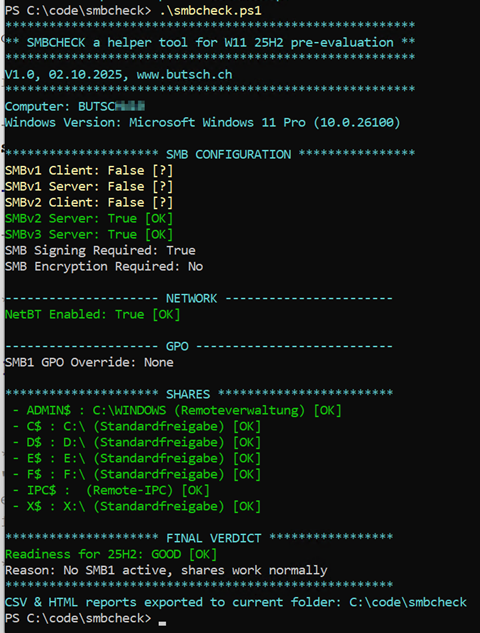
A Domain Joined W11 client looks OK
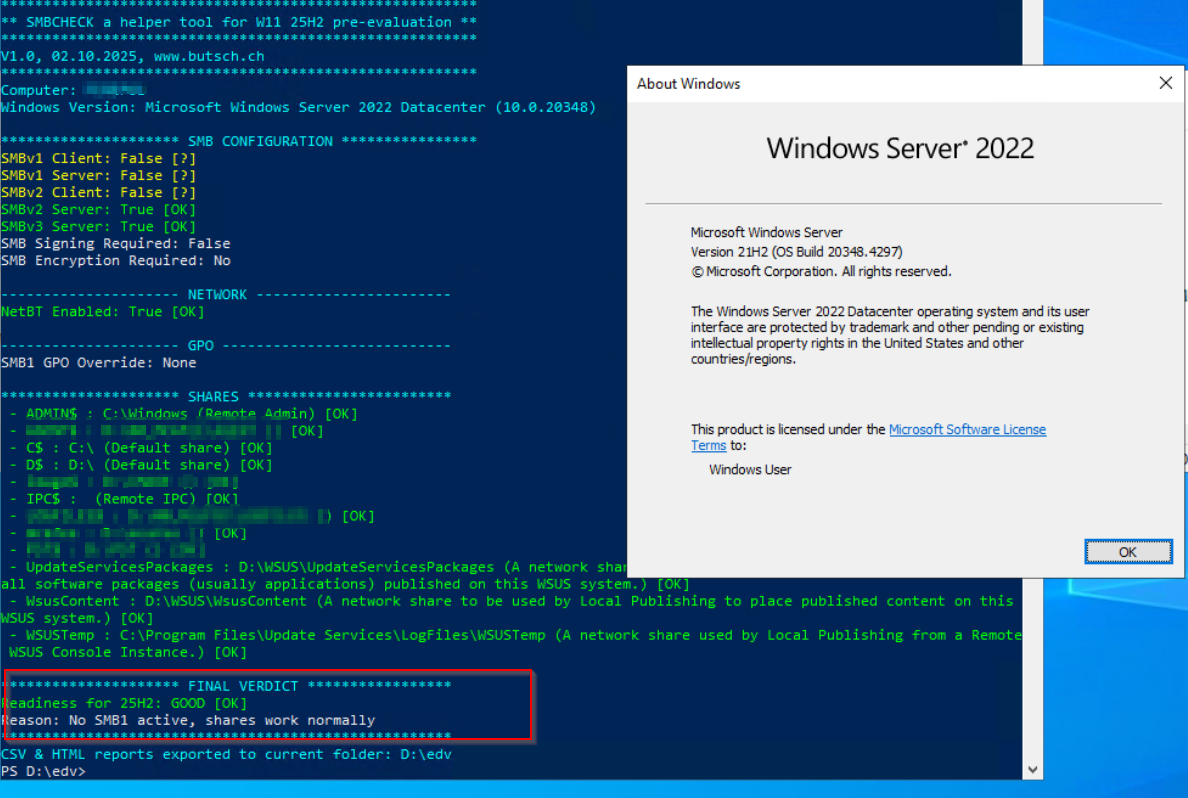
A Server 2022 Kombi Trellix EPO 5.1 and WSUS Server
A Server 2019 with a company with long update/migration history
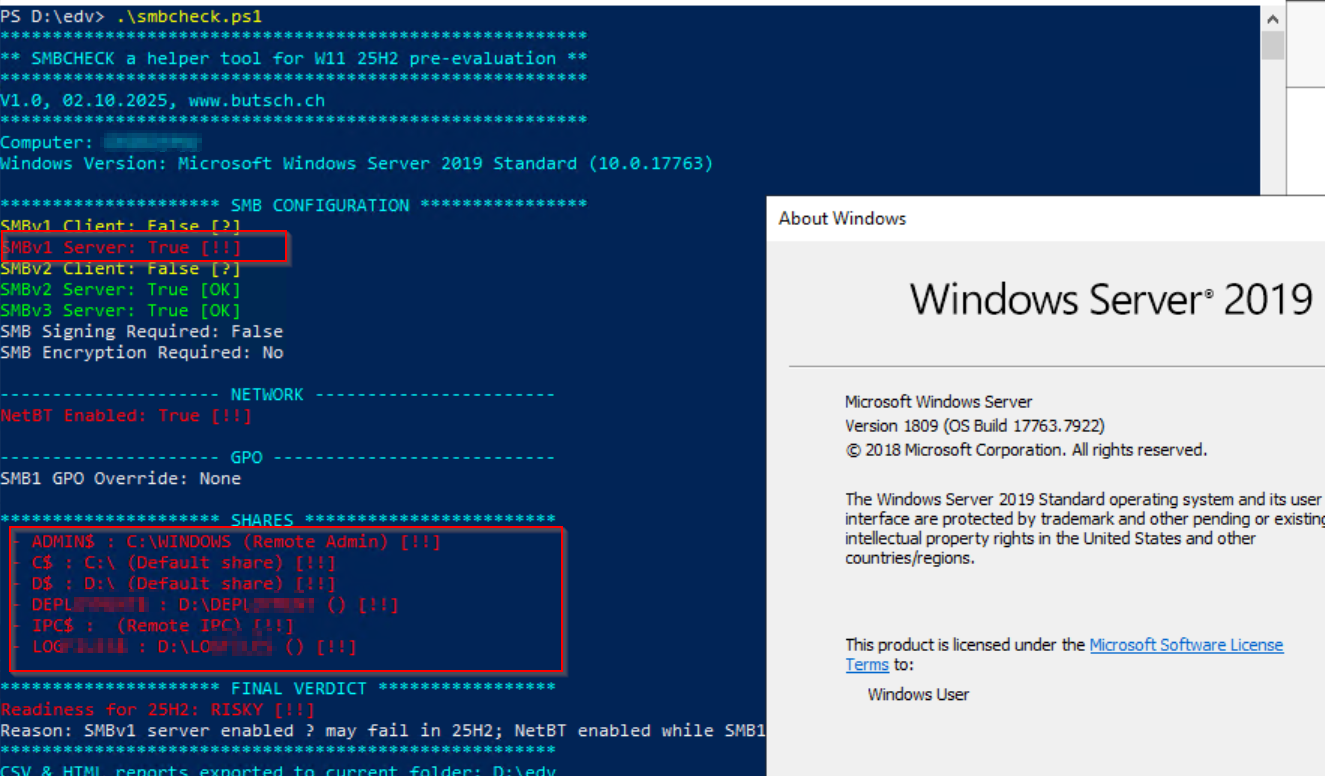
Active Directory Domain Controller DC Server 2019
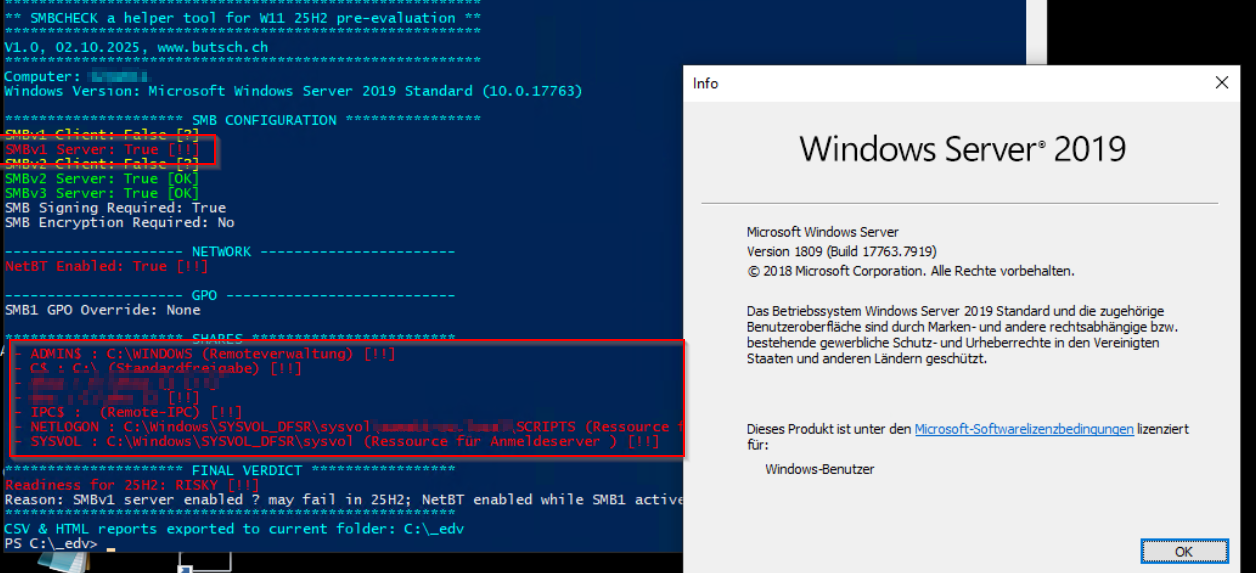
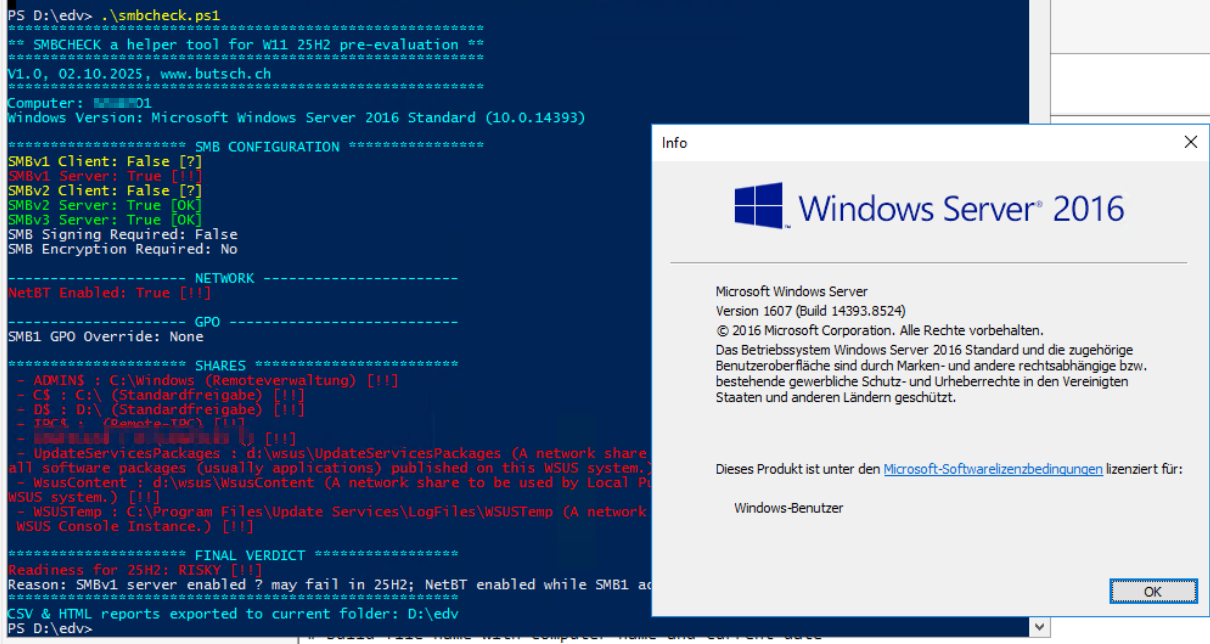
A Server 2016 Kombi EPO and WSUS