
 Click on the Category button to get more articles regarding that product.
After you install September 2026 09-2026 patch day updates RDS may not work
Microsoft Addresses Windows Regressions With Emergency Out-of-Band Updates V2 re-release
reported issues currently include:
1) New connections start hanging a few hours after reboot with “Connecting…” and existing users are unable to log off
The following signatures are indicative of this particular issue:
- TerminalServices-RemoteConnectionManager Event 20498: “Remote Desktop Services has taken too long to complete the client connection”
- Winlogon Event 6005: “The winlogon notification subscriber SessionEnv is taking long time to handle the notification event (Disconnect)”
- TermService status:
StopPendingrather thanRunning
2) Black Screens on Login after installing KB5124008 / KB5120998 on Desktop OS VDAs
Administrators dealing with instability after the September 2026 Windows security update cycle can now install newly released out-of-band (OOB) updates from Microsoft.
The emergency releases target several post-update regressions affecting different areas of Windows. Among the reported problems are failures involving Remote Desktop Services, Microsoft Management Console, RDS Licensing Diagnoser, File Explorer, and the Windows Update interface.
For enterprise environments, the Remote Desktop issue is particularly significant. On affected installations, RDP sessions may fail to establish correctly or users may be unable to complete the logon process. Some systems have also shown broader instability, including servers becoming unresponsive.
The issue emerged after organizations began deploying Microsoft’s September security patches. Reports from administrators indicated that the problem could interfere with normal remote administration, particularly on systems that rely heavily on RDS.
Microsoft subsequently confirmed the behaviour and has now provided the OOB releases as a corrective measure rather than requiring affected environments to wait for the next scheduled cumulative update.
Administrators should verify the applicable package against their Windows version and build number before deployment and prioritize testing in environments where Remote Desktop Services is business-critical.
# 09-2026 September Update V2 RDS/RDP fix Out-of-Band 14.09.2026 release date for all OS
# www.butsch.ch
# Windows 10 21H2 and 22H2: KB5129236
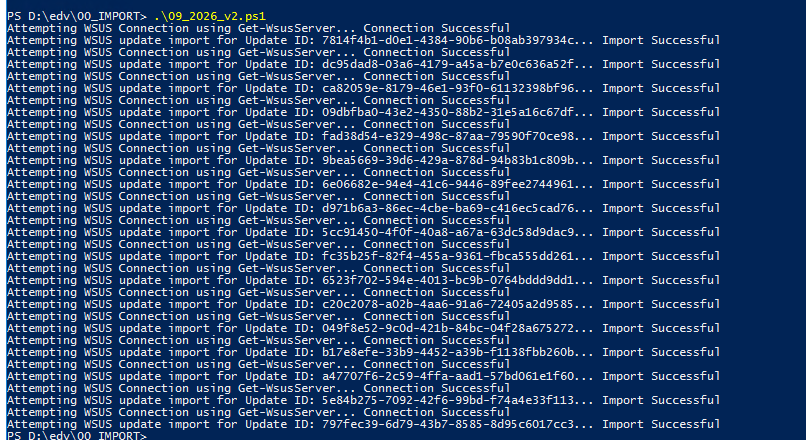
.\ImportUpdateToWSUS.ps1 -UpdateId 7814f4b1-d0e1-4384-90b6-b08ab397934c
.\ImportUpdateToWSUS.ps1 -UpdateId dc95dad8-03a6-4179-a45a-b7e0c636a52f
.\ImportUpdateToWSUS.ps1 -UpdateId ca82059e-8179-46e1-93f0-61132398bf96
.\ImportUpdateToWSUS.ps1 -UpdateId 09dbfba0-43e2-4350-88b2-31e5a16c67df
.\ImportUpdateToWSUS.ps1 -UpdateId fad38d54-e329-498c-87aa-79590f70ce98
.\ImportUpdateToWSUS.ps1 -UpdateId 9bea5669-39d6-429a-878d-94b83b1c809b

# Windows 11 24H2 and 25H2: KB5129195
.\ImportUpdateToWSUS.ps1 -UpdateId 6e06682e-94e4-41c6-9446-89fee2744961
.\ImportUpdateToWSUS.ps1 -UpdateId d971b6a3-86ec-4cbe-ba69-c416ec5cad76
.\ImportUpdateToWSUS.ps1 -UpdateId 5cc91450-4f0f-40a8-a67a-63dc58d9dac9
.\ImportUpdateToWSUS.ps1 -UpdateId fc35b25f-82f4-455a-9361-fbca555dd261
.\ImportUpdateToWSUS.ps1 -UpdateId 6523f702-594e-4013-bc9b-0764bddd9dd1
.\ImportUpdateToWSUS.ps1 -UpdateId c20c2078-a02b-4aa6-91a6-72405a2d9585

# Windows Server 2012: KB5129244
.\ImportUpdateToWSUS.ps1 -UpdateId c3701550-2bb2-4b11-9648-42647a9557dc

# Windows Server 2012R2: KB5129243
.\ImportUpdateToWSUS.ps1 -UpdateId 2fc5af0b-b026-4cbe-a461-f76c5c2d6e8c

# Windows Server 2016: KB5129239
.\ImportUpdateToWSUS.ps1 -UpdateId 4f77404b-40b9-4b14-b638-c76767231ca1
.\ImportUpdateToWSUS.ps1 -UpdateId 5edbcc90-3afa-4e6a-aadd-882ee1876268
.\ImportUpdateToWSUS.ps1 -UpdateId c38e4c04-1db8-4d60-a997-a30eff356496

# Windows Server 2019: KB5129238
.\ImportUpdateToWSUS.ps1 -UpdateId 049f8e52-9c0d-421b-84bc-04f28a675272
.\ImportUpdateToWSUS.ps1 -UpdateId b17e8efe-33b9-4452-a39b-f1138fbb260b
.\ImportUpdateToWSUS.ps1 -UpdateId a47707f6-2c59-4ffa-aad1-57bd061e1f60

# Windows Server 2022: KB5129237
.\ImportUpdateToWSUS.ps1 -UpdateId 5e84b275-7092-42f6-99bd-f74a4e33f113

# Windows Server 2025: KB5129235
.\ImportUpdateToWSUS.ps1 -UpdateId 797fec39-6d79-43b7-8585-8d95c6017cc3
1. Download the import script
Microsoft provides the official WSUS catalog import script here:
Download the ImportUpdateToWSUS.ps1 script from this documentation page.
2. Import updates into WSUS
Each update must be imported using its Microsoft Update Catalog UpdateId (GUID):
.\ImportUpdateToWSUS.ps1 -UpdateId <GUID>
Example:
.\ImportUpdateToWSUS.ps1 -UpdateId 7814f4b1-d0e1-4384-90b6-b08ab397934c
Each KB listed above must be resolved individually to its corresponding UpdateId GUID before import.
3. Where to get the UpdateId
The UpdateId is retrieved from the Microsoft Update Catalog:
https://www.catalog.update.microsoft.com
Search for the KB number (e.g. KB5091575), open the correct update entry, and copy the UpdateId GUID from the details view.

Citrix:
https://support.citrix.com/external/article/CTX697101/issues-with-microsoft-windows-september.html
Microsoft latest:
Remote Desktop Services might stop responding after Sept. 2026 security update
Status Originating update History
Resolved KB5129237 OS Build 20348.5622
KB5122882
2026-09-08 Resolved: 2026-09-14, 10:00 PT
Opened: 2026-09-11, 11:19 PT
After installing the September 2026 Windows security update (KB5122882), some organizations might experience issues with Remote Desktop Services (RDS).
In some environments, RDS might become unstable, resulting in RDP connections failing after several minutes, sign-in issues, or servers hanging at “Please wait for the Remote Desktop Configuration”. Related tools, including Microsoft Management Console (MMC), RDS Licensing Diagnoser, and File Explorer might also become unresponsive. Additionally, the Windows Update page might stop responding and continuously display a loading indicator.
Resolution: This issue is resolved by the out-of-band (OOB) update released on September 14, 2026 (KB5129237), and in updates released after this date.
IT administrators who deployed a temporary mitigation through Group Policy do not need to take any action before installing this OOB update.
This OOB update is cumulative and includes all improvements and security protections contained in previous Windows updates. As a best practice, we recommend installing the latest update available for your devices, as it contains important improvements and issue resolutions, including this one.
Affected platforms:
Client: Windows 11, version 26H1; Windows 11, version 25H2; Windows 11, version 24H2; Windows 11, version 23H2; Windows 10, version 22H2; Windows 10, version 21H2; Windows 10 Enterprise LTSC 2019; Windows 10 Enterprise LTSC 2016
Server: Windows Server 2025; Windows Server 2022; Windows Server 2019; Windows Server 2016; Windows Server 2012 R2; Windows Server 2012