Category: Deployment

Microsoft Updates 2992611 / 3011780 from 18/19.11.2014 re-releases Exchange/IIS/DC’s

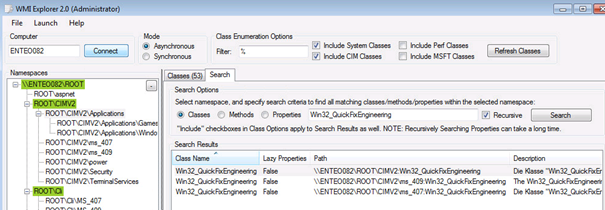
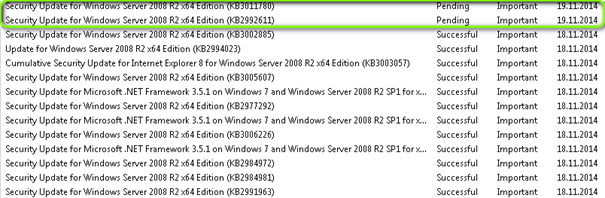
  Event 4002, Exchange 2010 CAS, MSExchange Availability     Microsoft KB 3011780 (V2) gets re-releases on 19.11.2014 Microsoft KB 2992611 (V3) gets re-releases on 19.11.2014 (V2) / 09.12.2014 (V3)   https://technet.microsoft.com/en-us/library/security/ms14-066.aspx V1.0 (November 11, 2014): Bulletin published. V2.0 (November 18, 2014): Bulletin revised to announce the reoffering of the 2992611 update to systems running Windows […]

APPV 4.6 client Event 3144 and no Reporting

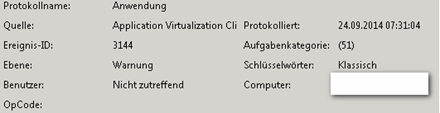
Error:     Event 3144 on APP-V (APPV) client machine Client:     Microsoft APPV client 4.6 SP1 with up to Hotfix6 The APPV client does not update usage data so you are unable to see which APPV apps are used also in terms of licenses. Der Berichtsdatencache von Application Virtualization Client konnte nicht an die Veröffentlichungsserver-URL ‘rtsp://customerapv01:554/’ gesendet […]

Internet Explorer / Scripts, Clear growing Cookie and Caching Files

Temporary Internet Files RunDll32.exe InetCpl.cpl,ClearMyTracksByProcess 8 Cookies RunDll32.exe InetCpl.cpl,ClearMyTracksByProcess 2 History RunDll32.exe InetCpl.cpl,ClearMyTracksByProcess 1 Form Data RunDll32.exe InetCpl.cpl,ClearMyTracksByProcess 16 Passwords RunDll32.exe InetCpl.cpl,ClearMyTracksByProcess 32 Delete All RunDll32.exe InetCpl.cpl,ClearMyTracksByProcess 255 Delete All – “Also delete files and settings stored by add-ons” RunDll32.exe InetCpl.cpl,ClearMyTracksByProcess 4351 @ECHO off :SelectOptions CLS ECHO Howdy %username% : ECHO 1. Delete Non-trusted web […]

Outlook 2010/2013 disable automatic Team Calendar

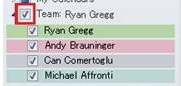
Wird im Active Directory das Manager Feld belegt dann erscheint bei dem Benutzer im Outlook Automatisch Kalender eine neue Gruppe “Team Kalender”. Haben viele Personen den gleichen Vorgesetzten kann dies zu einer riesen Liste führen Beispiel: Dieses verhalten wird von Microsoft wie folgt beschrieben: “Team Calendar is a feature of Outlook 2010. You could find […]

WSUS: Windows Update Server. Most common Problems. FAQ

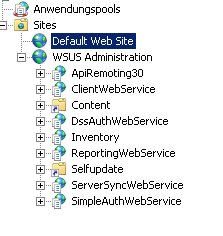
Connect to SQL Internal WSUS Datbase on diffrrent OS: Auf 2003:    \\.\pipe\MSSQL$MICROSOFT##SSEE\sql\queryAuf 2012R2: \\.\pipe\microsoft##WID\tsql\query Missing “SelfUpdate” in Default Website when running WSUS under 8530    To make sure that the self-update tree is working correctly, first make sure that there is a Web site set up on port 80 of the WSUS server. You must have […]

APP-V: Debug App-V Environment from package

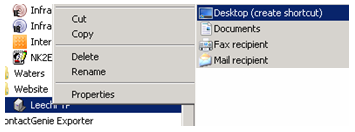
  On an APP-V Client crate a shortcut to the Desktop of the Existing APP-V Application you would like to debug.   Open the Properties of the Shortcut change the TARGET as marked and include /EXE cmd.exe Between sftray.exe” and /launch.exe Existing Target: “C:\Program Files\Microsoft Application Virtualization Client\sfttray.exe” /launch “LeechFTP 1.3.1.202” New Target for Command […]

Powershell: Add users to Active Directory Group membership from file, list all NON Expire accounts

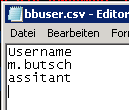
How to add user accounts to a membership of an Active Directory Group. Users in File: C:\edv\bbuser.csv Active Directory Group: SG_Blackberry_User_2010 Users: m.butsch and assistant (First LINE has to be UserName an not a user) Import-module ActiveDirectory Import-CSV “C:\edv\bbUser.csv” | % { Add-ADGroupMember -Identity SG_Blackberry_User_2010 -Member $_.UserName }   —————————————————————————— List all NON Expire accounts […]

Behebung Fehler Mcafee VSE 8.8 SP2 TRUST beim Scannen und Event 516 crypt32.dll

Dieses Dokument beschreibt wie man Mcafee Event516 oder Untrusted Fehlermeldung beheben kann. Fehlermeldung: scan32.exe – Ungültiges Bildscan64.exe – Ungueltiges Bild Versionen:   * Client Windows 7 64BIT SP1, German Language * Mcafee VSE 8.8 P2 with HF Post SP2 (8.8.0.975 BUILD 14.08.2012) * DAT 7180.0000 * Framework 4.8.0.887 * EPO 4.6   Der Fehler tritt […]

Microsoft APPV package Recipe for Irfanview 4.x

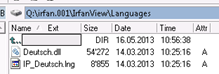
16.05.2013, Version 4.3X, Sequence Irfanview for Windows 7 64BIT Download all Binaries from the Website www.irfanview.com Download the Plugins you want Download the Language files you want Start sequencing on your clean machine. Install Irfanview to the Path q:\irfan.001 Copy over the Plugins and the language Files to the correct paths Place the language files […]

APPV How to call a script/batch FROM within the APPV bubble

Insert following Text as example into the Filename.OSD to run a script from wtihin the APPV package After:  </IMPLEMENTATION> <DEPENDENCY>  <CLIENTVERSION VERSION=”4.6.0.0″/>    <SCRIPT EVENT=”LAUNCH” TIMING=”PRE” TIMEOUT=”0″ PROTECT=”TRUE” ABORTRESULT=”-1″ SUCCESSRESULT=”1″ EXTERN=”TRUE”>       <SCRIPTBODY>@call \\\\apv01\\scripts$\\pabs\\check.cmd \n </SCRIPTBODY>      <SCRIPTBODY>if exist “C:\Program Files (x86)\Pabsnet\pabs.exe” (exit 0) else exit 1 </SCRIPTBODY>    </SCRIPT> </DEPENDENCY>